
Forum Replies Created
-
AuthorPosts
-
Tom
ParticipantChild themes are updated if you are using anyone of the studiopress themes...
... but there is no update notification and virtually no reason to update the child theme anyway. It seems like you're going through some bother for no practical purpose. <?>
Choose your next site design from over 350 Genesis themes.
[ Follow me: Twitter ] [ Follow Themes: Twitter ] [ My Favourite Webhost ]March 2, 2016 at 6:26 pm in reply to: Add widget area to top navigation bar (secondary) on News-Pro #180488Participanthttps://www.studiopress.community/topic/add-widget-area-to-navigation/#post-164047
Choose your next site design from over 350 Genesis themes.
[ Follow me: Twitter ] [ Follow Themes: Twitter ] [ My Favourite Webhost ]March 2, 2016 at 10:20 am in reply to: Altitude Pro Front-Page-1 Widget Background Transparency #180450ParticipantHi Adam,
The semi-transparent image cover is controlled by this code in the stylesheet at line 1250 of the demo/default theme. Change the background-gradient attributes as required.
.image-section {
    background: -moz-linear-gradient(top, rgba(0,0,0,0.2) 0%, rgba(0,0,0,0.5) 30%, rgba(0,0,0,0.8) 80%, rgba(0,0,0,0.9) 100%);
    background: -webkit-gradient(linear, left top, left bottom, color-stop(0%,rgba(0,0,0,0.2)), color-stop(30%,rgba(0,0,0,0.5)), color-stop(80%,rgba(0,0,0,0.8)), color-stop(100%,rgba(0,0,0,0.9)));
    background: -webkit-linear-gradient(top, rgba(0,0,0,0.2) 0%,rgba(0,0,0,0.5) 30%,rgba(0,0,0,0.8) 80%,rgba(0,0,0,0.9) 100%);
    background: -o-linear-gradient(top, rgba(0,0,0,0.2) 0%,rgba(0,0,0,0.5) 30%,rgba(0,0,0,0.8) 80%,rgba(0,0,0,0.9) 100%);
    background: -ms-linear-gradient(top, rgba(0,0,0,0.2) 0%,rgba(0,0,0,0.5) 30%,rgba(0,0,0,0.8) 80%,rgba(0,0,0,0.9) 100%);
    background: linear-gradient(to bottom, rgba(0,0,0,0.2) 0%,rgba(0,0,0,0.5) 30%,rgba(0,0,0,0.8) 80%,rgba(0,0,0,0.9) 100%);
    filter: progid:DXImageTransform.Microsoft.gradient( startColorstr='#33000000', endColorstr='#e6000000',GradientType=0 );
    display: table;
    overflow: hidden;
    table-layout: fixed;
    width: 100%;
}
Choose your next site design from over 350 Genesis themes.
[ Follow me: Twitter ] [ Follow Themes: Twitter ] [ My Favourite Webhost ]March 2, 2016 at 10:15 am in reply to: Moving Featured Images To Float Left of Title, Not of Content, on Blog Page #180449ParticipantTheme? Link to your site?
Choose your next site design from over 350 Genesis themes.
[ Follow me: Twitter ] [ Follow Themes: Twitter ] [ My Favourite Webhost ]Participantremove_action( 'genesis_before_loop', 'genesis_do_date_archive_title' );
Choose your next site design from over 350 Genesis themes.
[ Follow me: Twitter ] [ Follow Themes: Twitter ] [ My Favourite Webhost ]ParticipantHi David,
Simple Edits is the plugin option versus code; it's the first item mentioned on the 'footer/credits' reference page linked.
Choose your next site design from over 350 Genesis themes.
[ Follow me: Twitter ] [ Follow Themes: Twitter ] [ My Favourite Webhost ]ParticipantHi Jennifer,
This can be done through the slider settings and use of the post excerpt.
In the WordPress admin panel, Genesis > Slider Settings > Content Settings >> Select one of the following:
choose "Display Post Excerpts".Then for each slider post, write your custom excerpt text in the "Excerpt" section. If the Excerpt section is not visible in the post editor, Scroll to the top of the screen, click "Screen Options", ensure "Excerpt" is checked.
Choose your next site design from over 350 Genesis themes.
[ Follow me: Twitter ] [ Follow Themes: Twitter ] [ My Favourite Webhost ]ParticipantThis is actually how the theme works out of the box, from 880px wide down to small mobiles.. What changes have you made? Please post a link to your site.
Choose your next site design from over 350 Genesis themes.
[ Follow me: Twitter ] [ Follow Themes: Twitter ] [ My Favourite Webhost ]ParticipantI think this is what you are looking for:
https://www.studiopress.community/topic/changing-size-author-pro-image/
Choose your next site design from over 350 Genesis themes.
[ Follow me: Twitter ] [ Follow Themes: Twitter ] [ My Favourite Webhost ]ParticipantHeya,
Add these to your existing media queries:
@media only screen and (max-width: 768px) {

.header-image .site-title > a {
    height: 350px;

}


@media only screen and (max-width: 480px) {

.header-image .site-title > a {
    height: 150px;
}
Choose your next site design from over 350 Genesis themes.
[ Follow me: Twitter ] [ Follow Themes: Twitter ] [ My Favourite Webhost ]Participanthttp://my.studiopress.com/snippets/footer/#credits
Choose your next site design from over 350 Genesis themes.
[ Follow me: Twitter ] [ Follow Themes: Twitter ] [ My Favourite Webhost ]ParticipantBoth stylesheets are in play and using both statements you show above, the custom stylesheet loading after the child theme stylesheet and therefore taking precedence. Other than the duplication, I don't see a problem.
Choose your next site design from over 350 Genesis themes.
[ Follow me: Twitter ] [ Follow Themes: Twitter ] [ My Favourite Webhost ]Participanthi,
I'd suggest starting with the Genesis Custom Headers plugin.
If you want to get a little more involved with how things are done, try the Blox Lite - Content Blocks for Genesis plugin from the same author. Just released, quite functional and very easy to use.
Choose your next site design from over 350 Genesis themes.
[ Follow me: Twitter ] [ Follow Themes: Twitter ] [ My Favourite Webhost ]ParticipantNo, the plugin is failing, barring anything to be revealed by the plugin author.
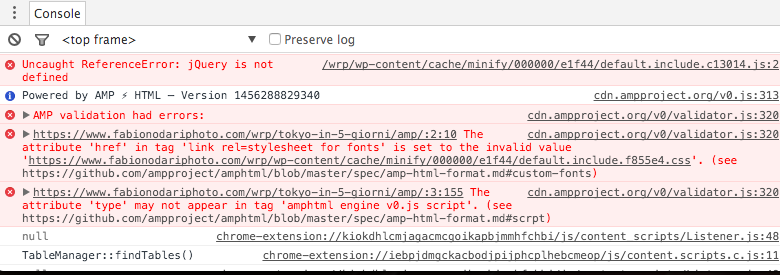
Possibly a cacheing issue?
Choose your next site design from over 350 Genesis themes.
[ Follow me: Twitter ] [ Follow Themes: Twitter ] [ My Favourite Webhost ]February 24, 2016 at 11:55 pm in reply to: Displaying Category Headings on all Category Archive Pages in Genesis #179856ParticipantSource: http://wpbeaches.com/displaying-category-headings-category-archive-pages-genesis/
Choose your next site design from over 350 Genesis themes.
[ Follow me: Twitter ] [ Follow Themes: Twitter ] [ My Favourite Webhost ]ParticipantHeya,
To improve the text you'll need to add some measured contrast, either with a background colour or text shadowing or both.
Try the following, each or in combination:
.home-section-1 .widget-wrap {
	padding-bottom: 20px;
	background: rgba(0,0,0,.3);

}

.home-section-1 {
	color: #fff;
	text-shadow: 2px 2px 3px #000;
}
As for background image presentation, it will be a tradeoff of presentation on mobile vs on desktop. I think your current setup looks OK on mobile.
Choose your next site design from over 350 Genesis themes.
[ Follow me: Twitter ] [ Follow Themes: Twitter ] [ My Favourite Webhost ]February 24, 2016 at 12:01 pm in reply to: Agency Pro – Using homepage featured posts widget in after entry widget #179802ParticipantLooks like you're well on track! Don't forget about mobile/media queries. (they should work better with 6 posts instead of 9.)
Choose your next site design from over 350 Genesis themes.
[ Follow me: Twitter ] [ Follow Themes: Twitter ] [ My Favourite Webhost ]ParticipantPossibly because your post contained "too many" links? This appears to be three links - after which your post will get caught in the forum spam feature.
Choose your next site design from over 350 Genesis themes.
[ Follow me: Twitter ] [ Follow Themes: Twitter ] [ My Favourite Webhost ]February 22, 2016 at 6:57 pm in reply to: Border on menu slices to 45 degrees at top on Sample Theme #179674ParticipantHi Bob,
I'd like to know why this is, too, but you should be able to fix this by adding the border to the menu item instead of the link..menu-item { border-left: 1px #fff solid; } .nav-primary .genesis-nav-menu a { /* border-left: 1px #fff solid; */ }
Choose your next site design from over 350 Genesis themes.
[ Follow me: Twitter ] [ Follow Themes: Twitter ] [ My Favourite Webhost ]Participant... and there goes the rest of my evening :).
Thanks for this and your other plugins, Nick!
Choose your next site design from over 350 Genesis themes.
[ Follow me: Twitter ] [ Follow Themes: Twitter ] [ My Favourite Webhost ] -
AuthorPosts