
Forum Replies Created
-
AuthorPosts
-
February 6, 2015 at 8:20 pm in reply to: Genesis Featured Posts Widget– Not showing Post Title? #140007
ameeker
MemberIn your stylesheet.css, remove the display:none on line 108
.page .entry-title {
display: none;
}If you're attempting to NOT have page titles show on individual pages, you might consider the plugin Genesis Title Toggle - it allows you to choose to display/not display the site titles on the pages themselves per page... and also to choose a default setting sitewide.
Looking for Genesis website design backed by strategy? http://www.angiemeekerdesigns.com
February 6, 2015 at 8:04 pm in reply to: Site being maliciously redirected, hosting company won't help #140005MemberHi Christina,
I'm sorry that's happened. I recommend having http://sucuri.net/ clean up your site for you. They will clean up your site, and also monitor it for a year.
Angie
Looking for Genesis website design backed by strategy? http://www.angiemeekerdesigns.com
MemberI'm not sure what you mean by "ribbon." Do you have an example of what you mean - perhaps somewhere else on your website or on another website? Also, what theme are you using?
Looking for Genesis website design backed by strategy? http://www.angiemeekerdesigns.com
MemberIn stylesheet.css of your theme change the code at line 1068 from
.header-image .title-area,
.header-image .site-title,
.header-image .site-title a {
float: left;
margin: 0;
padding: 0;
width: 100%;
}
to
.header-image .title-area,
.header-image .site-title,
.header-image .site-title a {
float: left;
margin: 0;
padding: 0;
width: 600px;
height: 130px;
}
Looking for Genesis website design backed by strategy? http://www.angiemeekerdesigns.com
MemberHi Gretchen,
Could you do me a favor and paste everything from your functions.php into a pastebin at http://pastie.org/, then once you've saved it, share the url of the paste here? I can see some errors in the code above, but I can't quite tell if it's because the code is wrong by itself, or if some code got garbled when it was pasted here.
Thanks,
Angie
Looking for Genesis website design backed by strategy? http://www.angiemeekerdesigns.com
MemberLooks like you sorted it out - the site title is 3dumbregular when I view it.
Looking for Genesis website design backed by strategy? http://www.angiemeekerdesigns.com
MemberI have successfully used both https://wordpress.org/plugins/woocommerce-csvimport/ and http://www.woothemes.com/products/product-csv-import-suite/ before on a Genesis site without problem.
Looking for Genesis website design backed by strategy? http://www.angiemeekerdesigns.com
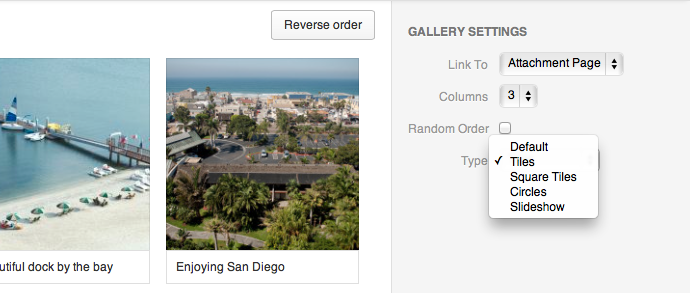
MemberIn the gallery settings, you need to choose to link images to Media File rather than the Attachment Page.
Looking for Genesis website design backed by strategy? http://www.angiemeekerdesigns.com
MemberCan you share a link to the site itself?
Looking for Genesis website design backed by strategy? http://www.angiemeekerdesigns.com
MemberMight also adjust the .ambiance-grid .entry-title padding afterwards.
Looking for Genesis website design backed by strategy? http://www.angiemeekerdesigns.com
MemberGot it remove the position: abosulte from .ambiance-grid .entry-header
Looking for Genesis website design backed by strategy? http://www.angiemeekerdesigns.com
MemberGot it. The above is correct. Doesn't work with Simple Edits at the same time.
Looking for Genesis website design backed by strategy? http://www.angiemeekerdesigns.com
Memberand this
add_filter( 'genesis_post_meta', 'sp_post_meta_filter' );
function sp_post_meta_filter($post_meta) {
	if ( is_singular( 'tipoftheday' ) ) {
		$post_meta = ' [post_terms before="See Articles Related To " taxonomy="totd_tags"]';
	}
	return $post_meta;
}
which also didn't work.
An example post is http://m.angiemeekerdesigns.com/totd/testing-tags/
Looking for Genesis website design backed by strategy? http://www.angiemeekerdesigns.com
Memberadd_filter( 'genesis_post_meta', 'post_meta_filter' ); function post_meta_filter($post_meta) { if ( !is_singular() ) return; $post_meta = '[post_tags taxonomy="tipoftheday"]'; return $post_meta; }I tried this with post_terms, post_tags, and post_categories all three, but none of those three worked to return either of the two custom taxonomies on the single posts.
Looking for Genesis website design backed by strategy? http://www.angiemeekerdesigns.com
January 12, 2014 at 7:14 pm in reply to: Moving custom post type code from functions.php to cpt template? #84872MemberI already have the CPT's defined (using the Custom Post Type UI plugin so the clients can more easily manage them in the future).
@Carrie - so the rest of the paste, minus the conditional to check for the CPT, the it would work as it is in single-tipsoftheday.php ?I've got the entire part about displaying custom fields in the functions.php file now.
Looking for Genesis website design backed by strategy? http://www.angiemeekerdesigns.com
MemberSo I found where it is - it's in the featured-post-widget.php in the genesis lib includes. So I can change it there, but that's not the right way to do it... because then any upgrades to genesis would overwrite it. But I want to use the built in Featured Posts instead of the plugin you mentioned.
Hmmm... Can I just pull a copy of that file into my child theme?
Looking for Genesis website design backed by strategy? http://www.angiemeekerdesigns.com
MemberSounds good to me.
Looking for Genesis website design backed by strategy? http://www.angiemeekerdesigns.com
August 23, 2013 at 8:07 pm in reply to: Custom Fields as Excerpt Per CPT (sample code provided) #58558MemberOk here is the paste of what i'm using that worked, but I'd like the custom fields to display to the right of the featured image, and then if there is any anything for the excerpt generated by the post to display below the featured image.
http://pastebin.com/1CZdRwub
and a link to the site:
http://worthington.angiemeekerdesigns.com/hotels/
Looking for Genesis website design backed by strategy? http://www.angiemeekerdesigns.com
August 23, 2013 at 6:54 pm in reply to: Custom Fields as Excerpt Per CPT (sample code provided) #58550MemberWell, it is working now http://pastebin.com/TkKwfPdW but ... I'll check back in a few... because it's still showing the custom excerpt that was created for the post, and I don't want that.
Looking for Genesis website design backed by strategy? http://www.angiemeekerdesigns.com
MemberOk so that's actually wrong, wrong, wrong. That doubling up the posts on all of my archive views (creating a new set of paged archives under the ones I already had). Hmm... All I really need to do is get the taxonomies to function the same way I have the CPT archives... *thinking*
Looking for Genesis website design backed by strategy? http://www.angiemeekerdesigns.com
-
AuthorPosts