Forum Replies Created
-
AuthorPosts
-
camscorner
ParticipantAre these posts no longer being monitored?
ParticipantOkay, thank you for your patience and assistance. It's not exactly what I was looking for but I'm getting there. I'll do some more research to see if I can tweak to what I need. Thank you again!
ParticipantThank you! Last question (I hope) 😉 If I select the Blog tab at the top, it does not show Comments (which I want it to and for visitors to comment.If I navigate from one of the three featured posts on the Home page, it shows Comments. How do I get Comments to show after the post (or the box for someone to add a new comment) when navigating from the Blog tab?
ParticipantOkay, I found something else that gave me the code that removed the date of the post. but now it still shows the number of comments. I don't want that. I want people to be able to comment and for the comments to show at the bottom of the post but I don't want the number up in the byline.
Like I said, I'm not very techie so I need the specific shortcode for me to copy and paste into Single Content or CSS or wherever it goes. Thank you.
ParticipantI have the opposite problem. I do not want to show the post date and author (or the number of comments). I am not super-techie and when I look at the shortcodes, I don't see one to remove the date, author, and comment number. I used to handle this with a prior Genesis plugin that's been discontinued.
ParticipantYay!!! Mystery solved. Thank you for hanging in there with me, Anita.
ParticipantYes. Any of those on the left should not be there. The image on the right is the one added to the post.
ParticipantUnfortunately, that is not the problem. I had researched that before the first time I submitted this problem. I just did so again on this post.
1. It only happens when I click off the Blog tab.
2. I hit the Next page at the bottom of the 1st post and the next post up does the same thing, except the "ghost" image is the same as the one shown at the right.
3. Also, as I mentioned previously, if I click on the "ghost" image when the post is open, the image disappears.
3. If you scroll down my Home page and access a post at the bottom and click on a post that way, there is no "ghost" image.
4. So, it must be tied with the Blog tab but I don't know how.
6. Also as stated previously, there is no Featured Image so it's not that.Color me very confused.
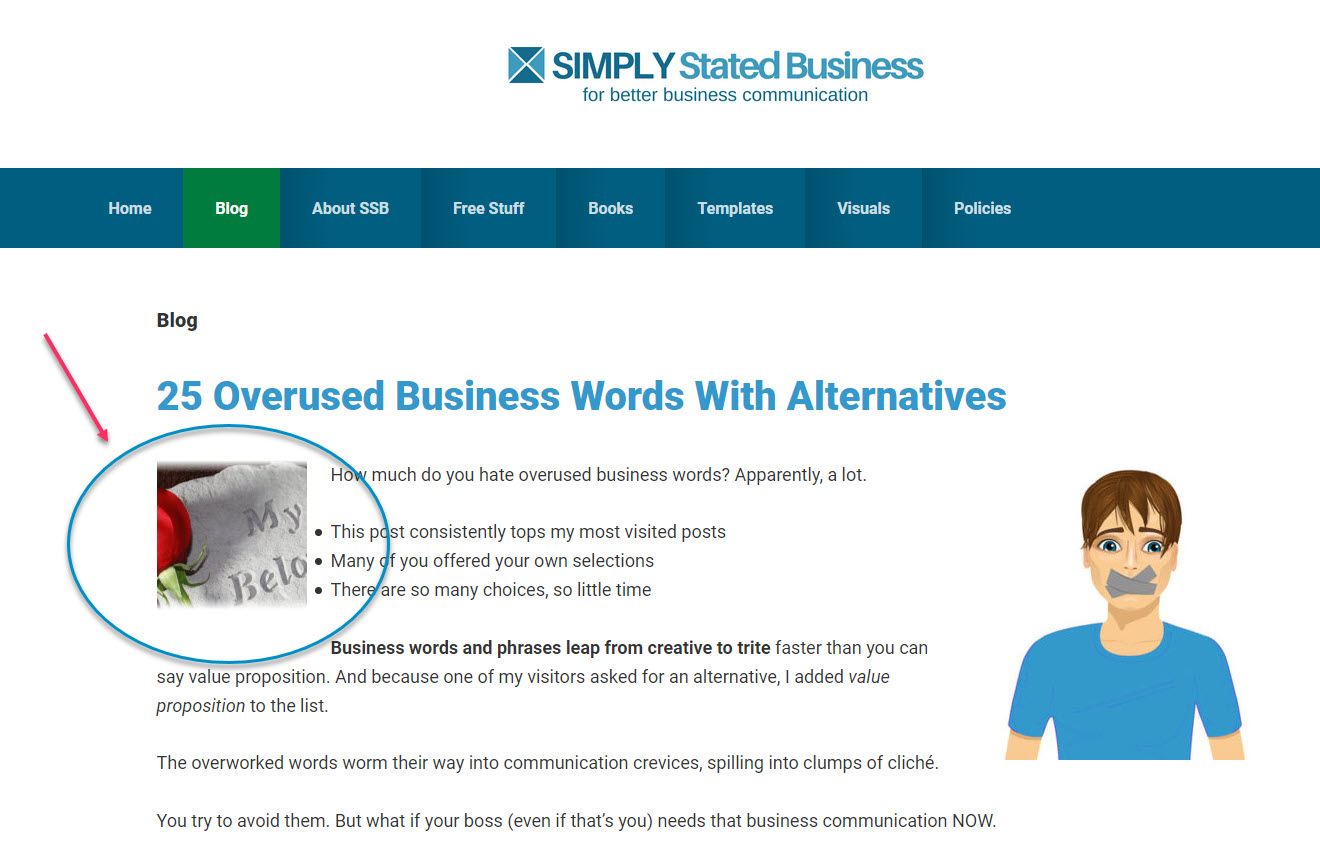
ParticipantThis is the latest blog post. As shown in my previous note, it appears to the left of the post. This is a snapshot of the latest. You can see it's a different "ghost" image than the one previously posted here.
https://simplystatedbusiness.com/wp-content/uploads/2020/03/Ghost-Image.jpg
ParticipantI still get this "extra" image periodically whenever I click on the Blog tab from the Home page. If I click on the extra image, it goes away, but sometimes comes back when I click on the Blog tab again. Weird. See my prior post to see an example of the "ghost" or "extra" image. Cannot figure out why it's doing that.
ParticipantThank you both for the education. My ignorance is showing. 😉 I didn't know Genesis showed as inactive. I will review the plugins. I wanted to change the design so I guess this is kicking me into that action. 🙂 Thanks again!
ParticipantNo, I thought of that, but it doesn't have a featured image. Totally weird (to me).
ParticipantThank you. I haven't visited the tutorial since I set it up. I did get it fixed just now but I am definitely going to review this. Thanks again!
ParticipantThank you, that worked! However, it still has the text portion smaller (see https://simplystatedbusiness.com). How can I increase the font size in the code to make it larger?
Thank you for educating the uneducated. 😉
ParticipantThank you. Pardon my non-techie ignorance, but do I put this in the Custom HTML widget or under the text in the Text widget?
ParticipantOkay, if you go to https://simplystatedbusiness.com, you will see the text and button that is not aligned like I want (and how it showed in the development site) `https://gist.github.com/anonymous/fdfd51052f016f5a9b715772f7dd339f'
I set this up by using a text widget for the "Discover the help..." text and used Custom HTML for the button. Thank you! I appreciate your help.
Participanthttps://gist.github.com/anonymous/fdfd51052f016f5a9b715772f7dd339fParticipantSorry for the confusion. The site is https://simplystatedbusiness.com.The button and text are small and shifted to the left.
Click on this link to view an image of how I want it to look (taken from my staging site).
Participantit"s the Genesis theme (Version: 3.2.1) with its child theme, Smart Passive Income (Version: 1.1.3). I'm a bit confused by the question.
ParticipantOops code was
<a href="https://simplystatedbusiness.com/" class="button">Click here for a quick site tour</a> -
AuthorPosts