• Skip to main content
  • Skip to forum navigation

StudioPress

  • Shop for Themes
  • My StudioPress

Forum navigation

  • Home
  • General Genesis Discussions
  • StudioPress Themes
  • Genesis Blocks
    • Genesis Blocks
    • Genesis Custom Blocks
  • Retired Themes
  • FAQs
  • Forum Rules
  • Internationalization and Translations
  • Forum Bugs and Suggestions
  • Forum Log In

Are You Using The WordPress Block Editor?

Genesis now offers plugins that help you build better sites faster with the WordPress block editor (Gutenberg). Try the feature-rich free versions of each plugin for yourself!

Genesis Blocks Genesis Custom Blocks

Jummul

Welcome!

These forums are for general discussion on WordPress and Genesis. Official support for StudioPress themes is offered exclusively at My StudioPress. Responses in this forum are not guaranteed. Please note that this forum will require a new username, separate from the one used for My.StudioPress.

Log In
Register Lost Password
  • Profile
  • Topics Started
  • Replies Created
  • Engagements
  • Favorites

Forum Replies Created

Viewing 6 posts - 21 through 26 (of 26 total)
← 1 2
  • Author
    Posts
  • June 24, 2013 at 5:10 am in reply to: Unable to remove excessive line breaks #47438
    Jummul
    Member

    I've tried disabling the Genesis Translations and the WP Native Dashboard plugins. Both at the same time and separately. Doesn't seem to change anything.

    EDIT: disabling ALL the plugins doesn't seem to change anything either.

    June 24, 2013 at 4:51 am in reply to: Unable to remove excessive line breaks #47435
    Jummul
    Member

    Thanks a bunch for your reply.

    I'm writing the posts DIRECTLY in the WordPress WYSIWYG Editor.

    For example: http://acupoflife.nl/fashion/zomers-roze/
    The space between the second and the third picture is way too larger than the space between the third and the fourth picture.

    But as you noted earlier: the excessive white spacing does not appear when I visit the website through google translate. Thanks for noticing that!

    My WordPress installation was English, but I replaced it with a Dutch variant a couple of weeks ago. I use the plugin Genesis Translations for translating some parts of the website, and I use the plugin WP Native Dashboard to have my dashboard in English.

    So perhaps it has something to do with one of these plugins?

    June 12, 2013 at 9:38 am in reply to: Disable Post Excerpts, enable More Tag #45477
    Jummul
    Member

    Amazing. That did it!

    Thanks a lot for your help!

    June 12, 2013 at 9:04 am in reply to: Disable Post Excerpts, enable More Tag #45466
    Jummul
    Member

    It is now!
    http://acupoflife.nl

    I've published one post for you to demonstrate it.

    Thanks again for the help!

    June 12, 2013 at 8:56 am in reply to: Disable Post Excerpts, enable More Tag #45460
    Jummul
    Member

    Thanks for your replies!

    But.. I did all that. It was actually the first thing I did. And still the post gets cut off after 50 words, and only the featured image is displayed (not the top one).
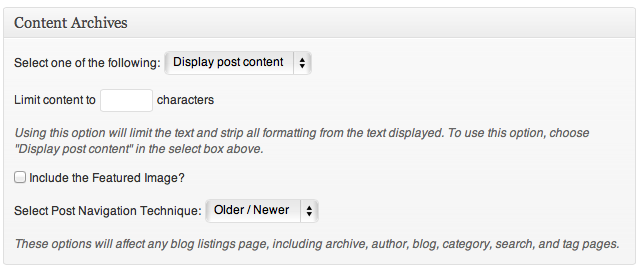
    Content Archives

    When I inspect the "Read More" (which I renamed Lees verder...) element, it shows this in Safari:
    `Lees verder …
    `

    June 12, 2013 at 8:30 am in reply to: Disable Post Excerpts, enable More Tag #45437
    Jummul
    Member

    Yes. With the possibility of using the More Tag when I want to break a post.

  • Author
    Posts
Viewing 6 posts - 21 through 26 (of 26 total)
← 1 2
« Previous Page

CTA

Ready to get started? Create a site or shop for themes.

Create a site with WP EngineShop for Themes

Footer

StudioPress

© 2026 WPEngine, Inc.

Products
  • Create a Site with WP Engine
  • Shop for Themes
  • Theme Features
  • Get Started
  • Showcase
Company
  • Brand Assets
  • Terms of Service
  • Accptable Usse Policy
  • Privacy Policy
  • Refund Policy
  • Contact Us
Community
  • Find Developers
  • Forums
  • Facebook Group
  • #GenesisWP
  • Showcase
Resources
  • StudioPress Blog
  • Help & Documentation
  • FAQs
  • Code Snippets
  • Affiliates
Connect
  • StudioPress Live
  • StudioPress FM
  • Facebook
  • Twitter
  • Dribbble