• Skip to main content
  • Skip to forum navigation

StudioPress

  • Shop for Themes
  • My StudioPress

Forum navigation

  • Home
  • General Genesis Discussions
  • StudioPress Themes
  • Genesis Blocks
    • Genesis Blocks
    • Genesis Custom Blocks
  • Retired Themes
  • FAQs
  • Forum Rules
  • Internationalization and Translations
  • Forum Bugs and Suggestions
  • Forum Log In

Are You Using The WordPress Block Editor?

Genesis now offers plugins that help you build better sites faster with the WordPress block editor (Gutenberg). Try the feature-rich free versions of each plugin for yourself!

Genesis Blocks Genesis Custom Blocks

Workstation pro theme: Flexible footer widget issues

Welcome!

These forums are for general discussion on WordPress and Genesis. Official support for StudioPress themes is offered exclusively at My StudioPress. Responses in this forum are not guaranteed. Please note that this forum will require a new username, separate from the one used for My.StudioPress.

Log In
Register Lost Password

Community Forums › Forums › Archived Forums › Design Tips and Tricks › Workstation pro theme: Flexible footer widget issues

This topic is: resolved

Tagged: flexible footer widget, widget alignment

  • This topic has 3 replies, 2 voices, and was last updated 10 years, 3 months ago by donsilvernail.
Viewing 4 posts - 1 through 4 (of 4 total)
  • Author
    Posts
  • October 7, 2015 at 6:58 am #167593
    donsilvernail
    Participant

    Hello all,

    I am new to Genesis but have been designing WordPress themes and sites since 2008.

    I have a question about the flexible footer widget position. I am not using widgets to setup my front page and have run into difficulties trying to get the flexible footer to align properly or anything resembling the sample demo.

    Doing some research on the demo itself it seems the footer positions are dependent upon the other widget areas being utilized.

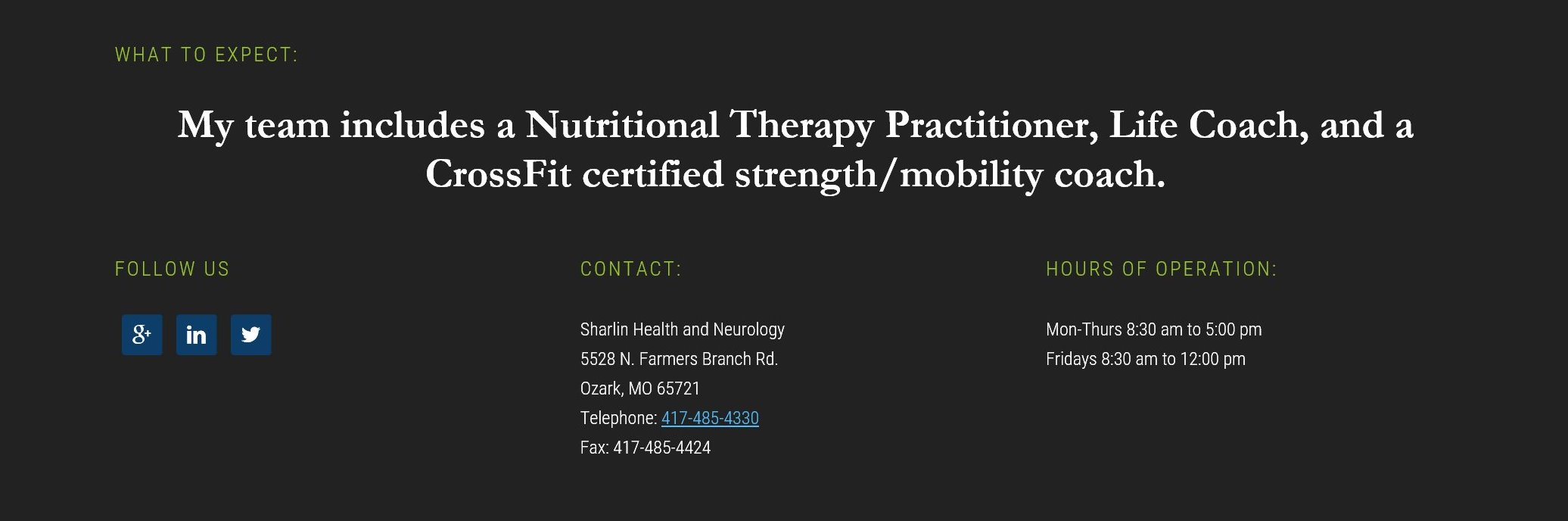
    This caused me to have to use 5 widgets In the flexible footer to accomplish what I am trying to do. one text widget is blank separating the top position form the bottom 3 columns. It also caused the bottom columns to break up in fourths not thirds. I had to modify this so I can have 3 spaced columns, What I need to do is align those 3 columns to center not left. Is there any tricks that can help me do that. Here is an image of the footer where bottom 3 positions are aligned to left I need them center, This is on a private server atm and cannot give access to url
    flexible footer widget aligned to left

    October 7, 2015 at 1:48 pm #167633
    Tom
    Participant

    Hi Don,

    Welcome to Genesis!

    The footer area layout depends on the number of widgets used in the "Flexible Footer" widget area, but not on others used in other widget areas. See: http://my.studiopress.com/setup/workstation-pro-theme/front-page-setup/front-page-flexible-footer-layout-configurations/

    You should be able to center your footer widget content with this CSS:

    .flex-footer {
    	text-align: center;
    }
    
    .flex-footer .widget:first-of-type {
    	text-align: left;
    }
    
    .flex-footer .widget:first-of-type h4.large-title{
    	text-align: center;	
    }

    Choose your next site design from over 350 Genesis themes.
    [ Follow me: Twitter ] [ Follow Themes: Twitter ] [ My Favourite Webhost ]

    October 7, 2015 at 4:49 pm #167643
    donsilvernail
    Participant

    Tom,

    I will give this a try

    October 7, 2015 at 5:04 pm #167645
    donsilvernail
    Participant

    Tom,

    This worked perfectly! I will close this thread as solved.

    I should have thought more basic on this and would have come up with it myself.

    Thanks.

  • Author
    Posts
Viewing 4 posts - 1 through 4 (of 4 total)
  • The topic ‘Workstation pro theme: Flexible footer widget issues’ is closed to new replies.

CTA

Ready to get started? Create a site or shop for themes.

Create a site with WP EngineShop for Themes

Footer

StudioPress

© 2026 WPEngine, Inc.

Products
  • Create a Site with WP Engine
  • Shop for Themes
  • Theme Features
  • Get Started
  • Showcase
Company
  • Brand Assets
  • Terms of Service
  • Accptable Usse Policy
  • Privacy Policy
  • Refund Policy
  • Contact Us
Community
  • Find Developers
  • Forums
  • Facebook Group
  • #GenesisWP
  • Showcase
Resources
  • StudioPress Blog
  • Help & Documentation
  • FAQs
  • Code Snippets
  • Affiliates
Connect
  • StudioPress Live
  • StudioPress FM
  • Facebook
  • Twitter
  • Dribbble