Community Forums › Forums › Archived Forums › General Discussion › Where is Portfolio in Aspire Pro?
- This topic has 6 replies, 2 voices, and was last updated 9 years, 6 months ago by
HeatherO.
-
AuthorPosts
-
November 29, 2016 at 8:40 am #196774
HeatherO
ParticipantI am building a site in Aspire. The demo shows a PORTFOLIO layout, but it does not appear to have that option. Any ideas where it is?
http://my.studiopress.com/themes/aspire/#demo-fullNovember 29, 2016 at 8:51 am #196775Victor Font
ModeratorAspire Pro uses standard posts for the portfolio. You should have a portfolio area on the Genesis Theme Settings page where you can choose the post categories to include or exclude. If you don't see the portfolio meta box, activate it by selecting the screen options in the upper right of the settings screen. There is a template called page_portfolio that you would assign to a new page t.o display the selected categories.
Regards,
Victor
https://victorfont.com/
Call us toll free: 844-VIC-FONT (842-3668)
Have you requested your free website audit yet?November 29, 2016 at 12:20 pm #196784ParticipantThank you. There is no "portfolio area on the Genesis Theme Settings page".
I installed "Featured Custom Post Type Widget for Genesis", but there is no "Portfolio" Post Type either.
Do I need some portfolio plugin maybe? I do not see that anywhere on the Aspire theme set up page.
Appreciate your help. Thank you.
November 29, 2016 at 1:07 pm #196789ModeratorI just installed Aspire Pro in my local environment. The Portfolio Page Settings is at the bottom of the Genesis/Theme Settings page. As I said earlier, if you don't see it, click on the screen settings button at the upper right of the page and make sure the Portfolio Page Settings checkbox is checked.
Again, as I said earlier, Aspire Pro uses standard post types, not custom post types. Create a category for your portfolio entries and select that category in the Portfolio Page Settings. You don't need a plugin.
Regards,
Victor
https://victorfont.com/
Call us toll free: 844-VIC-FONT (842-3668)
Have you requested your free website audit yet?November 29, 2016 at 1:48 pm #196795ParticipantThanks. As I said there is no portfolio area on the Genesis Theme Settings page.
I'm going to Genesis > Theme Settings
Screen Option (top right) only has the following, and all of them are checked:
- Information
- Custom Feeds
- Default Layout
- Breadcrumbs
- Comments and Trackbacks
- Content Archives
- Blog Page Template
- Header and Footer ScriptsThere is no Portfolio Page Settings there.
November 29, 2016 at 5:35 pm #196801ModeratorSomething is wrong in your install then. This is what is available when Aspire Pro is installed and there are no conflicts or caching issues:

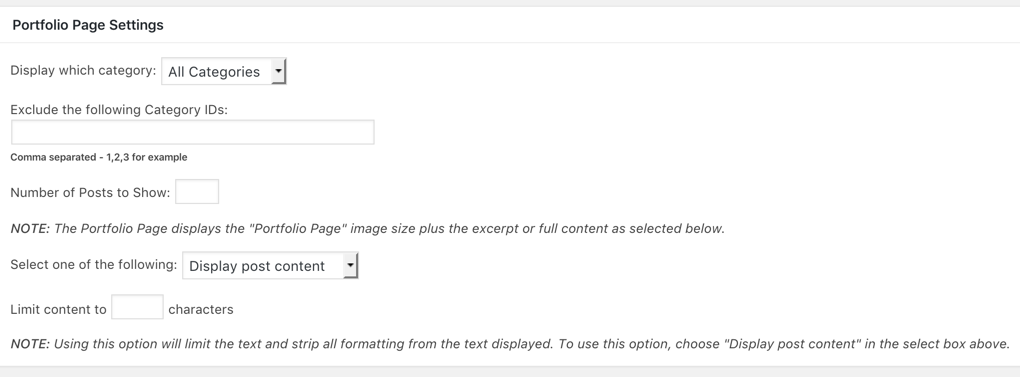
If I may suggest, perhaps you should contact the theme developer. Aspire Pro is not a Studio Press theme, It is sold on this site, but it was developed by http://www.appfinite.com/. They would be in a better position to help you troubleshoot the problem.
Regards,
Victor
https://victorfont.com/
Call us toll free: 844-VIC-FONT (842-3668)
Have you requested your free website audit yet?December 1, 2016 at 8:28 am #196856ParticipantOh wow, yeah I don't see that. Thank you for you help. Much appreciated!
-
AuthorPosts
- The forum ‘General Discussion’ is closed to new topics and replies.