• Skip to main content
  • Skip to forum navigation

StudioPress

  • Shop for Themes
  • My StudioPress

Forum navigation

  • Home
  • General Genesis Discussions
  • StudioPress Themes
  • Genesis Blocks
    • Genesis Blocks
    • Genesis Custom Blocks
  • Retired Themes
  • FAQs
  • Forum Rules
  • Internationalization and Translations
  • Forum Bugs and Suggestions
  • Forum Log In

Are You Using The WordPress Block Editor?

Genesis now offers plugins that help you build better sites faster with the WordPress block editor (Gutenberg). Try the feature-rich free versions of each plugin for yourself!

Genesis Blocks Genesis Custom Blocks

Using an image instead of text for Read More link

Welcome!

These forums are for general discussion on WordPress and Genesis. Official support for StudioPress themes is offered exclusively at My StudioPress. Responses in this forum are not guaranteed. Please note that this forum will require a new username, separate from the one used for My.StudioPress.

Log In
Register Lost Password

Community Forums › Forums › Archived Forums › Design Tips and Tricks › Using an image instead of text for Read More link

This topic is: resolved
  • This topic has 3 replies, 2 voices, and was last updated 12 years, 1 month ago by Tony @ AlphaBlossom.
Viewing 4 posts - 1 through 4 (of 4 total)
  • Author
    Posts
  • August 18, 2014 at 4:55 pm #119625
    wickedsimple
    Member

    I would like to use a graphic for the Read More link. I have used this code and the graphic does appear, however the text "Continue Reading" that I have to put in the Genesis Featured Featured Post widget still appears under it:

    http://www.analisamendmentblog.com

    This is the code I used to place the image:

    a.more-link {
    background-image: url(http://www.analisamendmentblog.com/wp-content/uploads/2014/08/keepreading.png);
    }

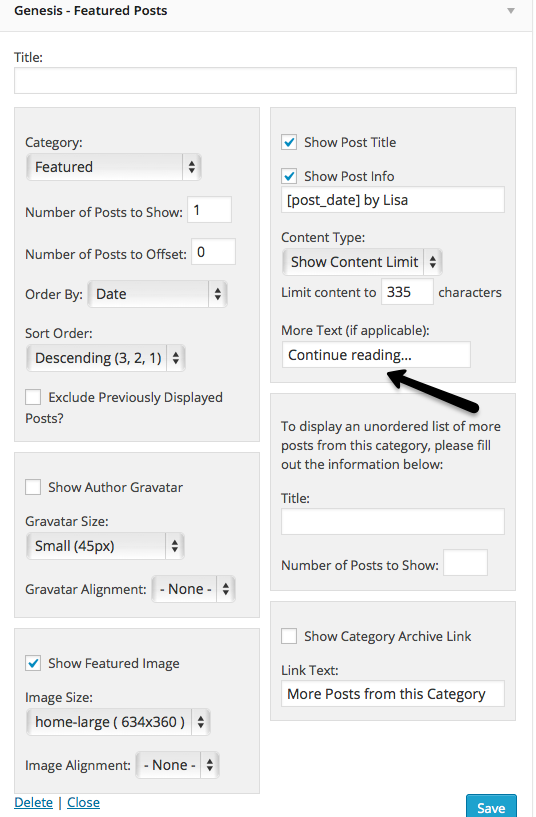
    See screenshot for place on widget where I put Continue Reading. If I delete that, then the graphic doesn't appear either.

    Screen shot of Genesis Featured Post widget

    Thanks!

    http://www.analisamendmentblog.com
    August 18, 2014 at 6:30 pm #119637
    Tony @ AlphaBlossom
    Member

    Hi,

    You have to do a couple extra things...try adding this to your theme's style.css file:

    
    a.more-link {
        background: url("http://www.analisamendmentblog.com/wp-content/uploads/2014/08/keepreading.png") no-repeat scroll 2px center rgba(0, 0, 0, 0);
        display: block;
        height: 25px;
        margin: 10px auto 0;
        text-indent: -9999px;
        width: 170px;
    }
    

    That will get you going in the right direction...you can play with changing "block" to "inline-block" if you want the button to continue right after the text (instead of on a new line), add "float: right;" if you want it to the right, etc.

    Let me know if you need any help getting it exactly how you want.

    Tony


    Tony Eppright | http://www.AlphaBlossom.com | Follow me on twitter @_alphablossom

    August 18, 2014 at 6:38 pm #119640
    wickedsimple
    Member

    Brilliant! Thank you for your quick reply - that worked! The graphic is only a placeholder graphic for now as I still have to design the logo and other elements. So I'll wait to play around with the spacing until I have the final graphic done.

    I REALLY appreciate your help!!

    Donna

    August 18, 2014 at 6:44 pm #119643
    Tony @ AlphaBlossom
    Member

    Hi Donna,

    Glad I could help! Have a great night.

    Tony


    Tony Eppright | http://www.AlphaBlossom.com | Follow me on twitter @_alphablossom

  • Author
    Posts
Viewing 4 posts - 1 through 4 (of 4 total)

  • The forum ‘Design Tips and Tricks’ is closed to new topics and replies.

CTA

Ready to get started? Create a site or shop for themes.

Create a site with WP EngineShop for Themes

Footer

StudioPress

© 2026 WPEngine, Inc.

Products
  • Create a Site with WP Engine
  • Shop for Themes
  • Theme Features
  • Get Started
  • Showcase
Company
  • Brand Assets
  • Terms of Service
  • Accptable Usse Policy
  • Privacy Policy
  • Refund Policy
  • Contact Us
Community
  • Find Developers
  • Forums
  • Facebook Group
  • #GenesisWP
  • Showcase
Resources
  • StudioPress Blog
  • Help & Documentation
  • FAQs
  • Code Snippets
  • Affiliates
Connect
  • StudioPress Live
  • StudioPress FM
  • Facebook
  • Twitter
  • Dribbble