• Skip to main content
  • Skip to forum navigation

StudioPress

  • Shop for Themes
  • My StudioPress

Forum navigation

  • Home
  • General Genesis Discussions
  • StudioPress Themes
  • Genesis Blocks
    • Genesis Blocks
    • Genesis Custom Blocks
  • Retired Themes
  • FAQs
  • Forum Rules
  • Internationalization and Translations
  • Forum Bugs and Suggestions
  • Forum Log In

Are You Using The WordPress Block Editor?

Genesis now offers plugins that help you build better sites faster with the WordPress block editor (Gutenberg). Try the feature-rich free versions of each plugin for yourself!

Genesis Blocks Genesis Custom Blocks

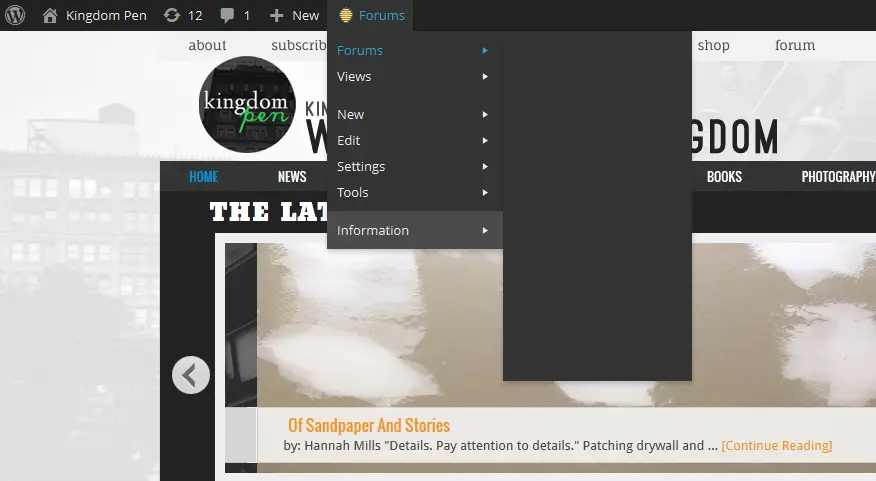
Top WordPress toolbar: Second level dropdowns blank (BuddyPress)

Welcome!

These forums are for general discussion on WordPress and Genesis. Official support for StudioPress themes is offered exclusively at My StudioPress. Responses in this forum are not guaranteed. Please note that this forum will require a new username, separate from the one used for My.StudioPress.

Log In
Register Lost Password

Community Forums › Forums › Archived Forums › Design Tips and Tricks › Top WordPress toolbar: Second level dropdowns blank (BuddyPress)

This topic is: not resolved

Tagged: .menupop, admin bar, blank, buddypress, dropdowns, second level, text, toolbar

  • This topic has 1 reply, 2 voices, and was last updated 12 years, 8 months ago by Susan.
Viewing 2 posts - 1 through 2 (of 2 total)
  • Author
    Posts
  • January 11, 2014 at 1:19 pm #84647
    ofloveandbeauty
    Member

    Hi! I’ve been searching for a solution and haven’t found one yet. I use bbPress and BuddyPress on my site, but am having trouble with the top menus' text not showing up. My top WordPress toolbar shows the first level when hovering over sections like “Forums” and the “Howdy” my account info, but when I hover over those items, the second level dropdowns are blank. They briefly show up when I guide my cursor to one of the edges of the box. Oddly, they show up fine when I’m in my WordPress Dashboard. Here’s a link to my site: http://kingdompen.org/

    However, you won't be able to see the problem unless you are logged into the site, so here is a link to a screenshot: http://kingdompen.org/wp-content/uploads/2014/01/2nd-level-dropdown-blank.png

    Thanks in advance!
    Rachel

    WordPress version 3.8
    Genesis version 2.0 (News Theme)
    BuddyPress version 1.9.1

    http://kingdompen.org
    February 21, 2014 at 2:44 pm #91769
    Susan
    Moderator

    As you posted this a while back, I hope you were able to get it resolved. If not, please report back, and I will escalate for you.

    Thanks!

  • Author
    Posts
Viewing 2 posts - 1 through 2 (of 2 total)
  • The forum ‘Design Tips and Tricks’ is closed to new topics and replies.

CTA

Ready to get started? Create a site or shop for themes.

Create a site with WP EngineShop for Themes

Footer

StudioPress

© 2026 WPEngine, Inc.

Products
  • Create a Site with WP Engine
  • Shop for Themes
  • Theme Features
  • Get Started
  • Showcase
Company
  • Brand Assets
  • Terms of Service
  • Accptable Usse Policy
  • Privacy Policy
  • Refund Policy
  • Contact Us
Community
  • Find Developers
  • Forums
  • Facebook Group
  • #GenesisWP
  • Showcase
Resources
  • StudioPress Blog
  • Help & Documentation
  • FAQs
  • Code Snippets
  • Affiliates
Connect
  • StudioPress Live
  • StudioPress FM
  • Facebook
  • Twitter
  • Dribbble