Community Forums › Forums › Archived Forums › Design Tips and Tricks › Question on Search Form
- This topic has 9 replies, 2 voices, and was last updated 6 years, 9 months ago by
Susan.
-
AuthorPosts
-
July 19, 2017 at 6:56 am #209286
YvonneOh
MemberHi,
How do I increase the search form's width at the top of my site? I also want to move the magnifying glass more to the right as it is covering part of the 'Search this website' words.
Yvonne
https://souperdiaries.com/July 20, 2017 at 8:12 pm #209372Susan
ModeratorUpdate the padding in this section of your stylesheet:
.search-form input[type="search"] {
background: #fff url(//souperdiaries.com/wp-content/themes/restored316-divine/images/icon-search.png) no-repeat right;
background-size: 36px 16px;
color: #888;
font-size: 10px;
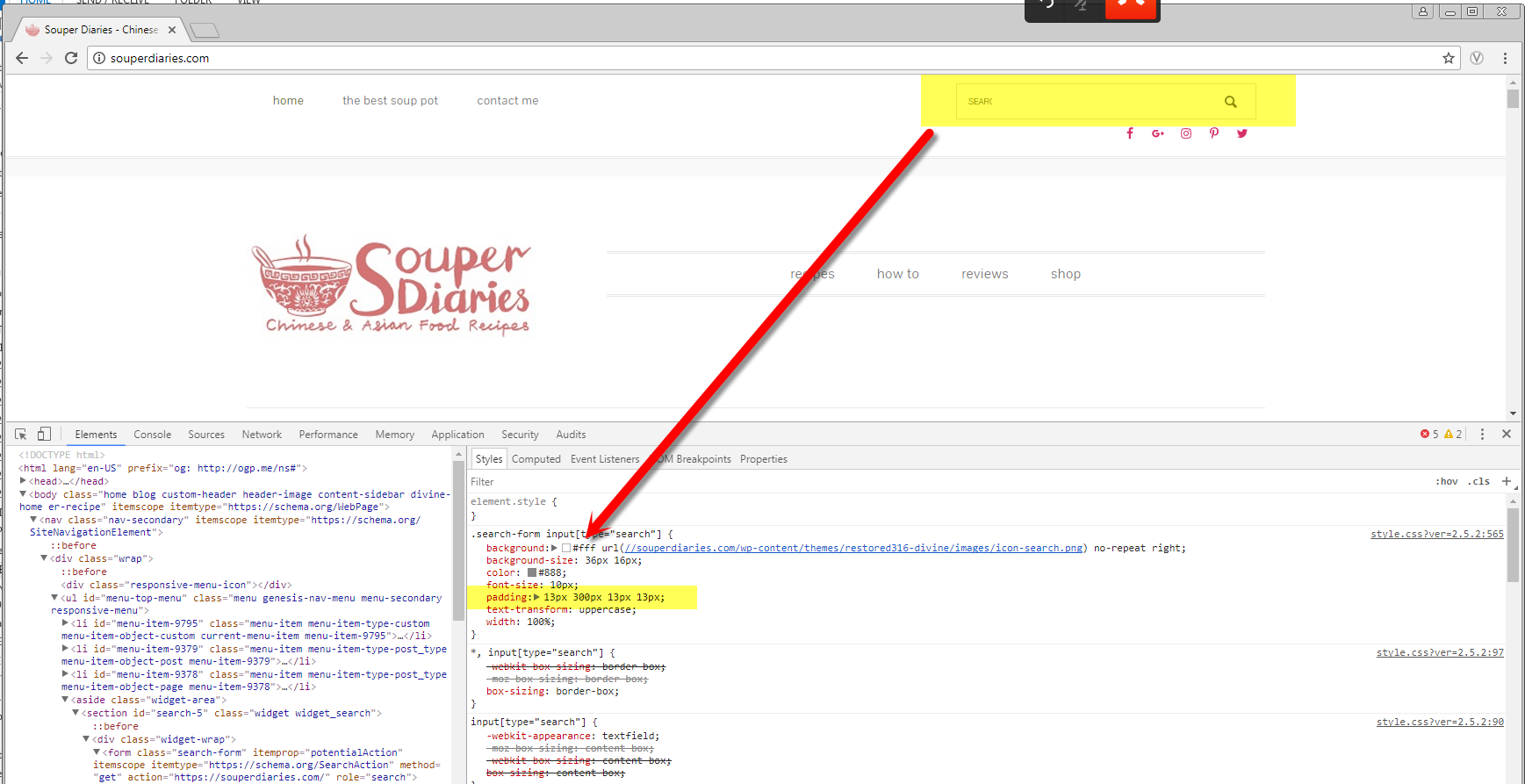
padding: 13px 30px 13px 13px;
text-transform: uppercase;
width: 100%;
}July 21, 2017 at 6:21 pm #209406MemberHi Susan,
I pasted the code in the custom CSS area and there appears to be no change. Did I paste it in the wrong place?
The code which I used previously to place the search form there is this:
@media (min-width: 1030px) {
.menu-secondary aside.widget-area {
width: 30%;
text-align: right;
}.menu-secondary .widget_search,
.menu-secondary .simple-social-icons {
display: inline-block;
width: auto;
vertical-align: middle;
}}
July 21, 2017 at 6:34 pm #209411ModeratorThe code I provided is what is already in your stylesheet; you need to change what's there - don't add it in in another location.
You need to just change the padding (for example, changing the 30px by something larger...)
July 21, 2017 at 6:54 pm #209412MemberSorry but I don't quite understand. So I used the code you provided and replaced the old code. Now the length of the search form is fine but it pushed down the simple social icons to the next line. How do I get it back up? https://souperdiaries.com/
July 21, 2017 at 8:41 pm #209419ModeratorThe code I provided is already there. You don't need to remove the code, and replace it. You need to update the code that's there, and then change the padding in this area to suit your needs:
padding: 13px 30px 13px 13px;
Go ahead and revert any changes you just made (either in the stylesheet or any custom CSS you have added), confirm that the Simple Social Icons are back where they were prior to updating your stylesheet, and then adjust the padding line shown above.
The Simple Social icons will be pushed down if you make the search bar too long...
July 21, 2017 at 9:30 pm #209428MemberI updated the code in my stylesheet and changed 30px to go higher up to 300px but there was no difference.
July 22, 2017 at 2:09 pm #209462ModeratorI am seeing the changes on your site. (see screenshot). If you are NOT seeing the changes, clear your browser's history, cookies & cache, and clear any caching plugins you have on your site.
 July 23, 2017 at 7:35 pm #209495Member
Thanks Susan. It's looking fine now. 🙂
July 23, 2017 at 10:18 pm #209499ModeratorYou are welcome 🙂
-
AuthorPosts
- The topic ‘Question on Search Form’ is closed to new replies.