• Skip to main content
  • Skip to forum navigation

StudioPress

  • Shop for Themes
  • My StudioPress

Forum navigation

  • Home
  • General Genesis Discussions
  • StudioPress Themes
  • Genesis Blocks
    • Genesis Blocks
    • Genesis Custom Blocks
  • Retired Themes
  • FAQs
  • Forum Rules
  • Internationalization and Translations
  • Forum Bugs and Suggestions
  • Forum Log In

Are You Using The WordPress Block Editor?

Genesis now offers plugins that help you build better sites faster with the WordPress block editor (Gutenberg). Try the feature-rich free versions of each plugin for yourself!

Genesis Blocks Genesis Custom Blocks

Pixel Happy Change column Widths

Welcome!

These forums are for general discussion on WordPress and Genesis. Official support for StudioPress themes is offered exclusively at My StudioPress. Responses in this forum are not guaranteed. Please note that this forum will require a new username, separate from the one used for My.StudioPress.

Log In
Register Lost Password

Community Forums › Forums › Archived Forums › Design Tips and Tricks › Pixel Happy Change column Widths

This topic is: not resolved
  • This topic has 6 replies, 3 voices, and was last updated 13 years, 3 months ago by fotissimo.
Viewing 7 posts - 1 through 7 (of 7 total)
  • Author
    Posts
  • March 24, 2013 at 7:12 pm #31011
    fotissimo
    Member

    I want to be able to include my affiliates links in my side bar, but in order to do that I need to increase the size of the template.

    I need the side column to be 320.  What areas do I need to change to accomplish this?

    March 24, 2013 at 7:27 pm #31013
    Susan
    Moderator

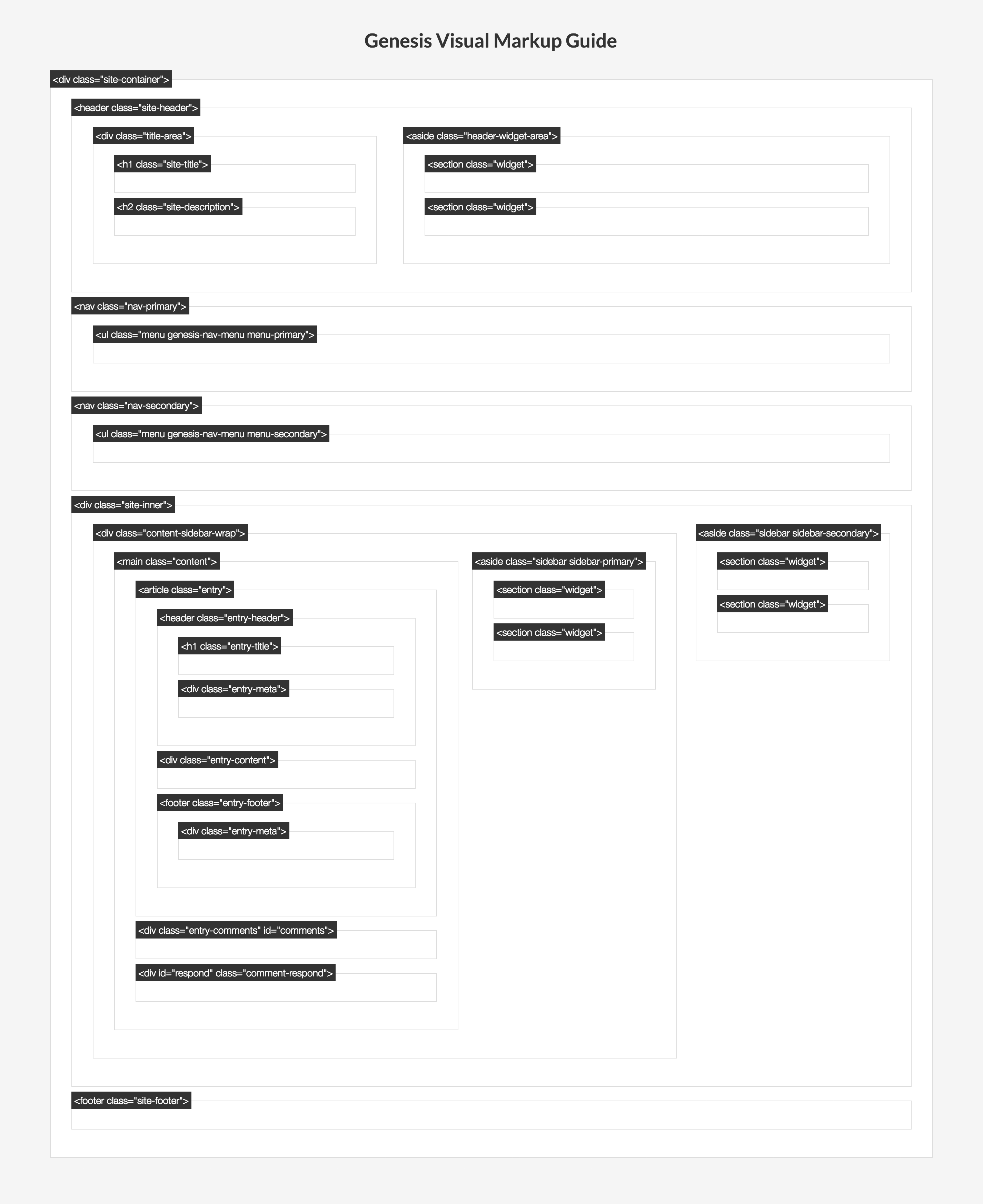
    Take a look at this visual mark-up guide - it shows each of the areas which make up the width of your site:

    http://www.studiopress.com/images/gen_markup.png

    March 24, 2013 at 8:39 pm #31038
    fotissimo
    Member

    Thank you!  That should help a lot (and not just with this question!).

    March 24, 2013 at 8:40 pm #31040
    Susan
    Moderator

    If you get stuck with something, post back and I'll check it out (also include a link to your site!)

    March 26, 2013 at 3:57 pm #31422
    fotissimo
    Member

    Here is the link to my site.

    From the picture, I broke things down.

    #inner is 920 (with a 20 padding on each side to equal 960)

    I am only using one sidebar.

    #content-sidebar-wrap = 750
    #sidebar-alt = 150

    750 + 150 = 900 + (3x) 20 padding. = 960

    #content = 480#sidebar = 250

    480 + 250 = 730 + a 20 padding between the 2 = 750

    I changed #content-sidebar-wrap from 750 to 650

    I changed #sidebar-alt  from 15o to 250

    I changed #content from 480 to 380

    I changed #sidebar from 250 to 350.

    It widened the sidebar however, it did decrease the content and now the sidebar is pushed down under the content on the right side.

    I know I'm missing something obvious.  What did I miss?

    (Thank you again for the image.  It did help a lot).

    March 26, 2013 at 6:03 pm #31431
    bandj
    Member

    when you have content and 1 sidebar, that sidebar will be #sidebar not alt sidebar. So your content + sidebar have to equal 920px total (and that includes the space between them). So if you want the sidebar 350px then your content should be 550px which will give you the 20px gutter between content and sidebar. Just make them both add up to 900px.

    March 26, 2013 at 8:37 pm #31444
    fotissimo
    Member

    #content {
    width: 550px;

    #sidebar {
    width: 350px;

    I went back to the original CSS and this time only changed #content and #sidebar.  Above is what I changed them to.  I am still having the same issue with it moving the sidebar to the bottom below content.

    I also tried the above and changed the #content-sidebar-wrap to 900 to see if that would change the issue, and it did not.

  • Author
    Posts
Viewing 7 posts - 1 through 7 (of 7 total)
  • The forum ‘Design Tips and Tricks’ is closed to new topics and replies.

CTA

Ready to get started? Create a site or shop for themes.

Create a site with WP EngineShop for Themes

Footer

StudioPress

© 2026 WPEngine, Inc.

Products
  • Create a Site with WP Engine
  • Shop for Themes
  • Theme Features
  • Get Started
  • Showcase
Company
  • Brand Assets
  • Terms of Service
  • Accptable Usse Policy
  • Privacy Policy
  • Refund Policy
  • Contact Us
Community
  • Find Developers
  • Forums
  • Facebook Group
  • #GenesisWP
  • Showcase
Resources
  • StudioPress Blog
  • Help & Documentation
  • FAQs
  • Code Snippets
  • Affiliates
Connect
  • StudioPress Live
  • StudioPress FM
  • Facebook
  • Twitter
  • Dribbble