• Skip to main content
  • Skip to forum navigation

StudioPress

  • Shop for Themes
  • My StudioPress

Forum navigation

  • Home
  • General Genesis Discussions
  • StudioPress Themes
  • Genesis Blocks
    • Genesis Blocks
    • Genesis Custom Blocks
  • Retired Themes
  • FAQs
  • Forum Rules
  • Internationalization and Translations
  • Forum Bugs and Suggestions
  • Forum Log In

Are You Using The WordPress Block Editor?

Genesis now offers plugins that help you build better sites faster with the WordPress block editor (Gutenberg). Try the feature-rich free versions of each plugin for yourself!

Genesis Blocks Genesis Custom Blocks

Pausing Politica theme rotating posts

Welcome!

These forums are for general discussion on WordPress and Genesis. Official support for StudioPress themes is offered exclusively at My StudioPress. Responses in this forum are not guaranteed. Please note that this forum will require a new username, separate from the one used for My.StudioPress.

Log In
Register Lost Password

Community Forums › Forums › Archived Forums › Design Tips and Tricks › Pausing Politica theme rotating posts

This topic is: not resolved

Tagged: featured, politica, posts, rotating

  • This topic has 1 reply, 2 voices, and was last updated 12 years, 3 months ago by Tom.
Viewing 2 posts - 1 through 2 (of 2 total)
  • Author
    Posts
  • March 18, 2014 at 11:43 am #95515
    DeborahM
    Member

    Hmm. Any reference to the "Politica" template we purchased a couple of years ago seems to have disappeared. Perhaps this is a general design question then.
    On this site: http://www.lll.hawaii.edu/
    the three featured posts rotate, currently 3 secs each. I have been asked to tweak the code such that when you select something it stays put until you finish reading it. Any thoughts? If not, I guess I'll just lengthen the viewing time.

    Much appreciated!!

    http://www.lll.hawaii.edu/
    March 18, 2014 at 8:39 pm #95593
    Tom
    Participant

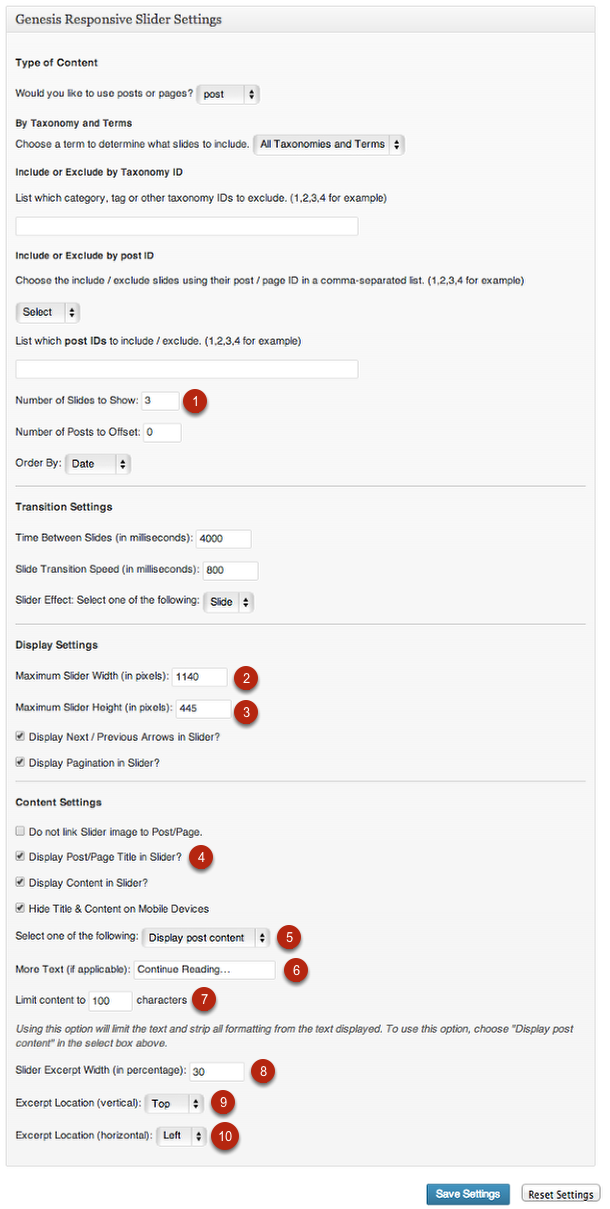
    Your theme appears to use the WP-cycle plugin, also use in the Crystal theme. I have found that this is easily replaced by the Genesis Responsive Slider . This takes some slider configuration and also some CSS changes to preserve the look of your front page.

    The benefit of using Genesis Responsive Slider is that the user can pause the display by hovering the mouse or selecting a slide with cursor left/right. See it used in the Executive theme (http://demo.studiopress.com/executive/). This screenshot is from the Executive theme setup (http://my.studiopress.com/wp-content/uploads/executive-pro-slider-settings.png)

    It will be easier to lengthen the viewing time as-is, but more flexible to use the slider.


    Choose your next site design from over 350 Genesis themes.
    [ Follow me: Twitter ] [ Follow Themes: Twitter ] [ My Favourite Webhost ]

  • Author
    Posts
Viewing 2 posts - 1 through 2 (of 2 total)
  • The forum ‘Design Tips and Tricks’ is closed to new topics and replies.

CTA

Ready to get started? Create a site or shop for themes.

Create a site with WP EngineShop for Themes

Footer

StudioPress

© 2026 WPEngine, Inc.

Products
  • Create a Site with WP Engine
  • Shop for Themes
  • Theme Features
  • Get Started
  • Showcase
Company
  • Brand Assets
  • Terms of Service
  • Accptable Usse Policy
  • Privacy Policy
  • Refund Policy
  • Contact Us
Community
  • Find Developers
  • Forums
  • Facebook Group
  • #GenesisWP
  • Showcase
Resources
  • StudioPress Blog
  • Help & Documentation
  • FAQs
  • Code Snippets
  • Affiliates
Connect
  • StudioPress Live
  • StudioPress FM
  • Facebook
  • Twitter
  • Dribbble