• Skip to main content
  • Skip to forum navigation

StudioPress

  • Shop for Themes
  • My StudioPress

Forum navigation

  • Home
  • General Genesis Discussions
  • StudioPress Themes
  • Genesis Blocks
    • Genesis Blocks
    • Genesis Custom Blocks
  • Retired Themes
  • FAQs
  • Forum Rules
  • Internationalization and Translations
  • Forum Bugs and Suggestions
  • Forum Log In

Are You Using The WordPress Block Editor?

Genesis now offers plugins that help you build better sites faster with the WordPress block editor (Gutenberg). Try the feature-rich free versions of each plugin for yourself!

Genesis Blocks Genesis Custom Blocks

News Theme – Middle Left and Middle Right

Welcome!

These forums are for general discussion on WordPress and Genesis. Official support for StudioPress themes is offered exclusively at My StudioPress. Responses in this forum are not guaranteed. Please note that this forum will require a new username, separate from the one used for My.StudioPress.

Log In
Register Lost Password

Community Forums › Forums › Archived Forums › Design Tips and Tricks › News Theme – Middle Left and Middle Right

This topic is: not resolved

Tagged: css, middle left, middle right, New Theme

  • This topic has 2 replies, 3 voices, and was last updated 12 years, 6 months ago by vinothkanna.
Viewing 3 posts - 1 through 3 (of 3 total)
  • Author
    Posts
  • April 16, 2013 at 10:17 am #35761
    firenews
    Participant

    Our site is currently in maintenance mode while we upgrade from News V 1.0 to News V 2.1.

    http://www.firenews.net

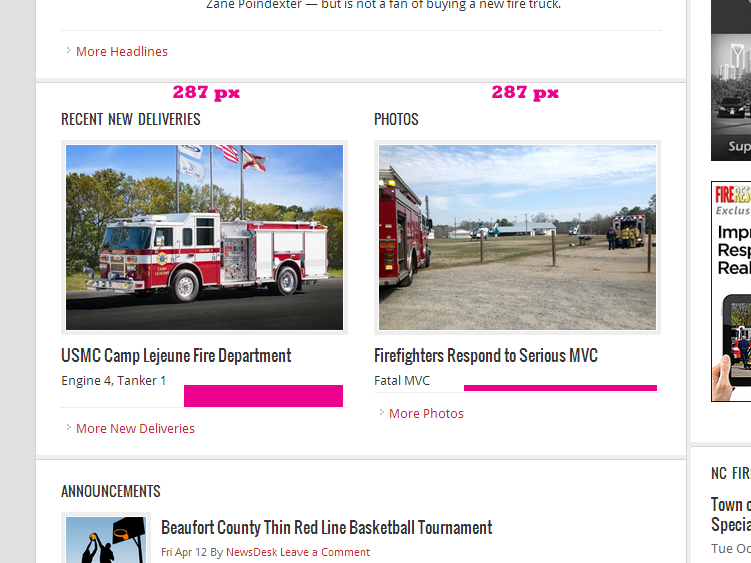
    Please reference this commented image hosted on another site:

    http://jeffharkey.com/wp-content/uploads/2013/04/middle-left-right-firenews.png

    Our intent is to make the home-middle-left and home-middle-right essentially identical in presenting content. It appears "out of the box" that the coding for home-middle-right is just a little different.

    We have changed the width to 287px for each (for .home-middle-left and .home-middle-right), and updated the h2 in the right column to match the left. Have also modified the functions.php to customize the image sizes to 277x184 for both.

    You'll see on the image there's a padding/margin difference just below the Excerpt that is being displayed. It's marked in Magenta with two rectangles.

    #1 - Where in the css do I need to change this value to match both columns?
    #2 - Any other adjustments necessary to ensure both columns present in the same manner?

    Thank you in advance.

    April 16, 2013 at 11:24 am #35777
    media317
    Participant

    It is difficult to answer without having access to the site.


    Alan Smith
    Media317

    August 16, 2013 at 12:53 pm #56856
    vinothkanna
    Member

    Hey Firenews!

    Have you solved your problem??

    Just go to style.css

    Find

    .home.content-sidebar #home-middle-left #home-bottom .featuredpost .post {
    padding: 0;

    change it to

    .home.content-sidebar #home-bottom .featuredpost .post {
    padding: 0;

  • Author
    Posts
Viewing 3 posts - 1 through 3 (of 3 total)
  • The forum ‘Design Tips and Tricks’ is closed to new topics and replies.

CTA

Ready to get started? Create a site or shop for themes.

Create a site with WP EngineShop for Themes

Footer

StudioPress

© 2026 WPEngine, Inc.

Products
  • Create a Site with WP Engine
  • Shop for Themes
  • Theme Features
  • Get Started
  • Showcase
Company
  • Brand Assets
  • Terms of Service
  • Accptable Usse Policy
  • Privacy Policy
  • Refund Policy
  • Contact Us
Community
  • Find Developers
  • Forums
  • Facebook Group
  • #GenesisWP
  • Showcase
Resources
  • StudioPress Blog
  • Help & Documentation
  • FAQs
  • Code Snippets
  • Affiliates
Connect
  • StudioPress Live
  • StudioPress FM
  • Facebook
  • Twitter
  • Dribbble