• Skip to main content
  • Skip to forum navigation

StudioPress

  • Shop for Themes
  • My StudioPress

Forum navigation

  • Home
  • General Genesis Discussions
  • StudioPress Themes
  • Genesis Blocks
    • Genesis Blocks
    • Genesis Custom Blocks
  • Retired Themes
  • FAQs
  • Forum Rules
  • Internationalization and Translations
  • Forum Bugs and Suggestions
  • Forum Log In

Are You Using The WordPress Block Editor?

Genesis now offers plugins that help you build better sites faster with the WordPress block editor (Gutenberg). Try the feature-rich free versions of each plugin for yourself!

Genesis Blocks Genesis Custom Blocks

Modifying post appearance

Welcome!

These forums are for general discussion on WordPress and Genesis. Official support for StudioPress themes is offered exclusively at My StudioPress. Responses in this forum are not guaranteed. Please note that this forum will require a new username, separate from the one used for My.StudioPress.

Log In
Register Lost Password

Community Forums › Forums › Archived Forums › Design Tips and Tricks › Modifying post appearance

This topic is: resolved

Tagged: arhives, categories, posts

  • This topic has 3 replies, 2 voices, and was last updated 11 years, 8 months ago by nutsandbolts.
Viewing 4 posts - 1 through 4 (of 4 total)
  • Author
    Posts
  • May 25, 2014 at 8:28 pm #106746
    Draceadan
    Member

    I am ussing a Genesis Child Theme - Blognews.

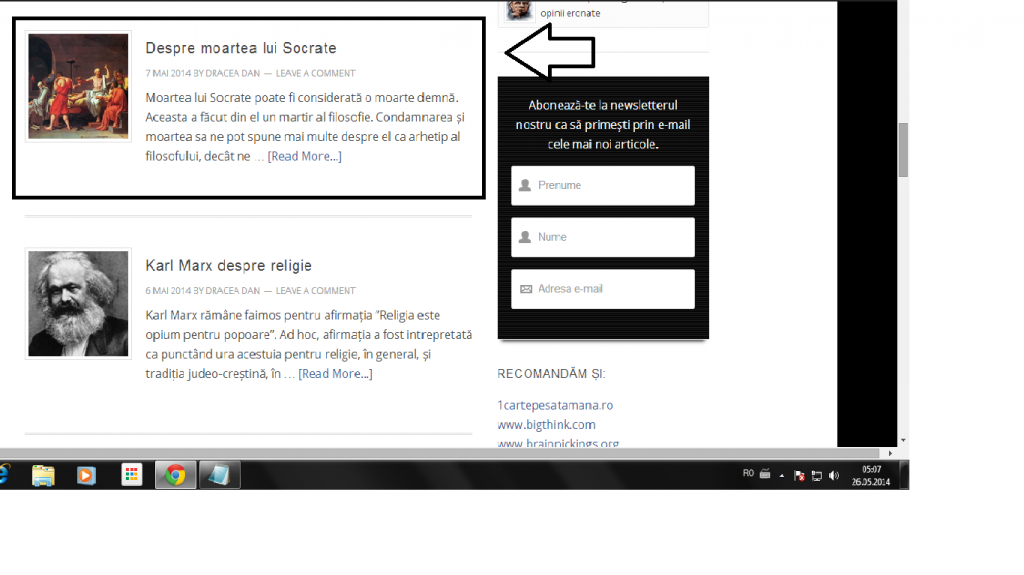
    I want my blog posts, in the arhive and category sections to appear as follow:

    http://i1071.photobucket.com/albums/u502/Ethinkro/model_zps0292c434.png

    Any suggestion, what should I do, what should I search for?

    The blog is ethink.ro

    http://ethink.ro
    May 25, 2014 at 9:04 pm #106748
    nutsandbolts
    Member

    In Genesis > Theme Settings, check the archive settings section. You should be able to use a content limit and check the box to use the featured image. That will affect category and date archives. Hope that helps!


    Andrea Whitmer, Owner/Developer, Nuts and Bolts Media
    I provide development and training services for designers • Find me on Twitter and Google+

    May 25, 2014 at 11:15 pm #106754
    Draceadan
    Member

    It worked. 😀

    SO simple, but I didn t know what to look for.

    Thanks, Andrea.

    May 25, 2014 at 11:38 pm #106758
    nutsandbolts
    Member

    No problem! I’ve marked this topic as resolved for now, but feel free to open a new topic if you need help with anything else. 🙂


    Andrea Whitmer, Owner/Developer, Nuts and Bolts Media
    I provide development and training services for designers • Find me on Twitter and Google+

  • Author
    Posts
Viewing 4 posts - 1 through 4 (of 4 total)
  • The topic ‘Modifying post appearance’ is closed to new replies.

CTA

Ready to get started? Create a site or shop for themes.

Create a site with WP EngineShop for Themes

Footer

StudioPress

© 2026 WPEngine, Inc.

Products
  • Create a Site with WP Engine
  • Shop for Themes
  • Theme Features
  • Get Started
  • Showcase
Company
  • Brand Assets
  • Terms of Service
  • Accptable Usse Policy
  • Privacy Policy
  • Refund Policy
  • Contact Us
Community
  • Find Developers
  • Forums
  • Facebook Group
  • #GenesisWP
  • Showcase
Resources
  • StudioPress Blog
  • Help & Documentation
  • FAQs
  • Code Snippets
  • Affiliates
Connect
  • StudioPress Live
  • StudioPress FM
  • Facebook
  • Twitter
  • Dribbble