Community Forums › Forums › Archived Forums › Design Tips and Tricks › Mobile Responsive Issues
- This topic has 5 replies, 2 voices, and was last updated 8 years ago by
carasmo.
-
AuthorPosts
-
April 4, 2016 at 12:53 am #182854
anewcreation
ParticipantHI Everyone,
I posted this earlier but got new info and wanted to make sure all the info was in one post so it's not confusing.
The menu on the site I'm making used to be mobile responsive (the menu turns into the 3 black lines and you have to click on it to see the all the buttons). But I was asked to take 3 of the buttons and put them under one. So now, you will see it says SERVICES, and then there are 3 menu buttons that drop down under that. So now that I've added the drop-down, when I look at the site on the phone, the 3 black lines that represented the menu are no longer there, and it just displays the menu buttons across the page, and one even drops down to the next line (the contact button). I also noticed that the banner image disappeared. So that is how it looks on my iPhone.
The person I made the site for said he is seeing something different, he said he can see the mobile responsive menu (black bars), but when he touches the services button, the drop-down menu does not show. So his phone is having problems also, but the opposite of what I am seeing. He also said when he views it on his iPad in landscape view, it's perfect, but if he moves the iPad to portrait view it has the same problem the iPhone has. Wow, this is confusing! Some of you may view it on your phone and it will look fine, but it still looks like the image below on my phone.
I don't have a screenshot of what it looks like on his phone, but there is what it looks like on my iPhone 6.
http://hspmentor.com/wp-content/uploads/2016/04/IMG_2048.pngWould anyone have advice on how to get the menu to go back to being mobile responsive on my phone (the 3 bars that represent the menu), and how to get the banner to show again : )
Has anyone else had this problem?
Thanks so much for your help! Jeanne : )
http://hspmentor.com/April 4, 2016 at 5:23 am #182864carasmo
ParticipantYou would click the down arrow (which is hard to see on the blue background) and that toggles the child menu. Only by clicking the toggle part will the services menu show the children, clicking the menu item itself will take you to the services page.
In other words, your menu is working exactly like all other WordPress installs of the same menu script.
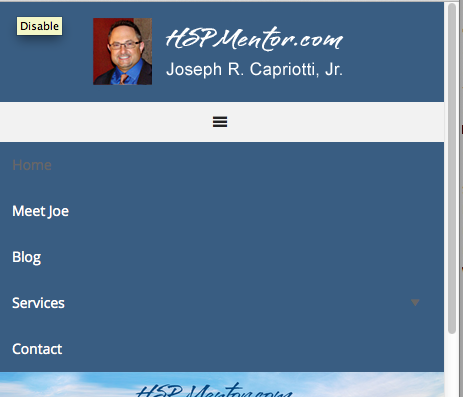
April 4, 2016 at 8:35 am #182880ParticipantThanks so much for taking the time to post your screenshot, Carasmo. I will change the color of the arrow! Thanks for letting me know. Any ideas of why it looks different on my phone, the mobile responsive bars are gone and so is the banner. I have an iPhone 6. Thanks again, Jeanne : )
 April 4, 2016 at 8:38 am #182882Participant
Clear your iPhone cache is all I can think of. Google "clear cache on iPhone".
April 4, 2016 at 3:47 pm #182917ParticipantThanks for being so helpful. Everything is working fine now : )
April 4, 2016 at 4:46 pm #182924Participant -
AuthorPosts
- The topic ‘Mobile Responsive Issues’ is closed to new replies.