Community Forums › Forums › Archived Forums › Design Tips and Tricks › Messed Up My Site – Foodie Theme
- This topic has 11 replies, 4 voices, and was last updated 9 years, 3 months ago by
thefrugalmom.
-
AuthorPosts
-
January 12, 2015 at 12:12 pm #137211
thefrugalmom
MemberIn an attempt (or desperate plea) to center the images (when viewing from home page), I changed something and I don't know what!
Here are the things I'd like to fix:
1. Remove the text from the left side of the image. I would like text to show up under image.
2. Center the images on the home screen.Thanks for your assistance!
http://thefrugalmom.netJanuary 12, 2015 at 12:48 pm #137215masonjarsalads
MemberI think it's because your pictures are smaller on those posts, that happened to one of mine too.
January 12, 2015 at 4:49 pm #137253MemberNo, because the pictures were centered before I messed it up. :/
January 13, 2015 at 12:57 pm #137348Jodi P
MemberI'm seeing the alignleft class assigned to your images on the home page. Can you go into your post editor and click on the image and when the toolbar pops up double check that you've assigned no alignment.
January 13, 2015 at 2:49 pm #137360MemberThe images are centered when viewing the individual post. It's just the home page that displays all images to the left. I use grid loop...
January 14, 2015 at 6:22 am #137424Carlo
MemberHi Dawn. Go into your Genesis theme settings and the section 'Content Archives'. Have you selected Image Alignment none?
January 15, 2015 at 2:24 am #137517MemberYes, it is set to none. :/
January 15, 2015 at 9:11 am #137536MemberHi Dawn. I think I figured it out. It's because you said this:
I use grid loop…
The grid loop forces images to align to the left. But I think you should be able to change that, by adding the following code to your theme functions:
add_filter( 'genesis_grid_loop_args', function( $args ) {
	$args[ 'grid_image_class' ] = '';
	return $args;
} );
Let me know if that works.
January 15, 2015 at 9:49 am #137545MemberI added this to functions, then cleared my cache. The images (from home page) are still aligned to the left.
January 15, 2015 at 9:58 am #137548MemberIs there a way to change the image class? I am no where near as experienced as some of you, but I see this when I click on "inspect element":
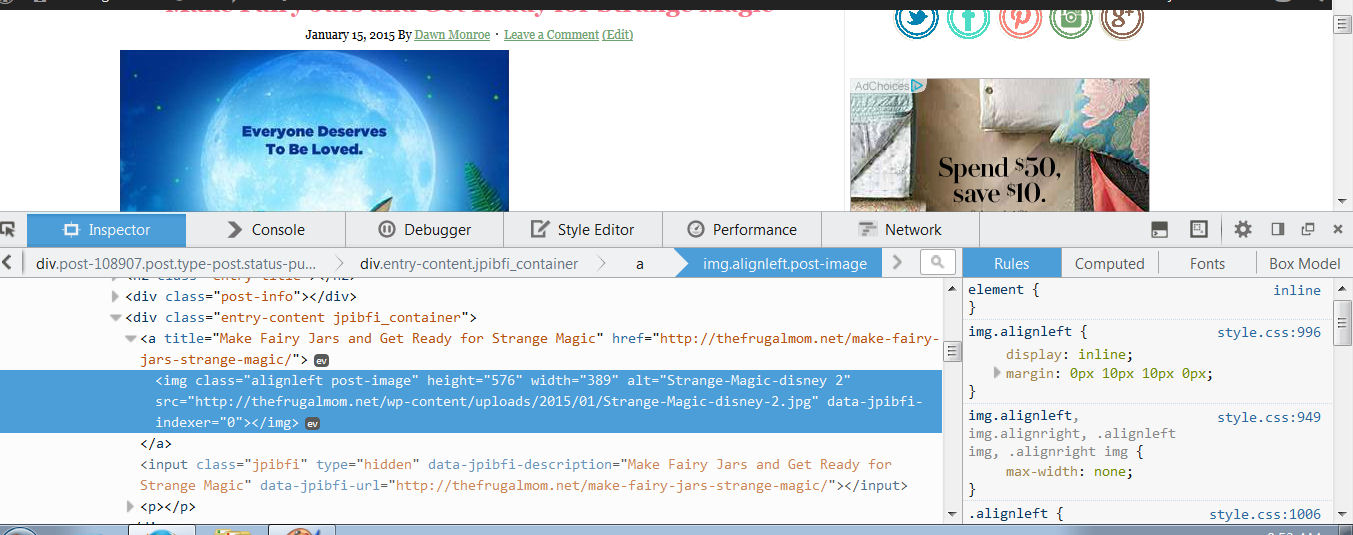
It shouldn't say align left. Everything I have checked is align "none" or "center" (or so I thought)
January 18, 2015 at 11:46 am #137861MemberHi Dawn. Sorry the code didn't work. Try this:
add_filter( 'genesis_grid_loop_args', function( $args ) {
	$args[ 'grid_image_class' ] = 'aligncenter';
	$args[ 'feature_image_class' ] = 'aligncenter';
	return $args;
} );
January 20, 2015 at 3:53 am #138021MemberThat doesn't seem to work either. I took off
add_filter( 'genesis_grid_loop_args', function( $args ) {
$args[ 'grid_image_class' ] = '';
return $args;
} );and added
add_filter( 'genesis_grid_loop_args', function( $args ) {
$args[ 'grid_image_class' ] = 'aligncenter';
$args[ 'feature_image_class' ] = 'aligncenter';
return $args;
} );then deleted cache. No luck. :/
-
AuthorPosts
- The forum ‘Design Tips and Tricks’ is closed to new topics and replies.