• Skip to main content
  • Skip to forum navigation

StudioPress

  • Shop for Themes
  • My StudioPress

Forum navigation

  • Home
  • General Genesis Discussions
  • StudioPress Themes
  • Genesis Blocks
    • Genesis Blocks
    • Genesis Custom Blocks
  • Retired Themes
  • FAQs
  • Forum Rules
  • Internationalization and Translations
  • Forum Bugs and Suggestions
  • Forum Log In

Are You Using The WordPress Block Editor?

Genesis now offers plugins that help you build better sites faster with the WordPress block editor (Gutenberg). Try the feature-rich free versions of each plugin for yourself!

Genesis Blocks Genesis Custom Blocks

Manipulate margin around image in post

Welcome!

These forums are for general discussion on WordPress and Genesis. Official support for StudioPress themes is offered exclusively at My StudioPress. Responses in this forum are not guaranteed. Please note that this forum will require a new username, separate from the one used for My.StudioPress.

Log In
Register Lost Password

Community Forums › Forums › Archived Forums › Design Tips and Tricks › Manipulate margin around image in post

This topic is: not resolved
  • This topic has 1 reply, 2 voices, and was last updated 13 years, 2 months ago by Brad Dalton.
Viewing 2 posts - 1 through 2 (of 2 total)
  • Author
    Posts
  • July 31, 2013 at 1:33 pm #53416
    Jummul
    Member

    So I have post. With pictures. And text.

    My input is this:

    Dit weekend ben ik gelijk begonnen met het eerste karweitje: 
    de muur! Met een pot gele verf heb ik een saaie witte muur 
    veranderd in een arty-farty muur!<!--more--> <img alt="DIY 
    Wall art" src="http://acupoflife.nl/wp-content/uploads/cache
    /2013/07/DSC_3015-1/2213080013.jpg" width="640" height="223"
     /> Voordat ik begon met verven sneed ik eerst een driehoek uit 
    karton! Met een schaar kan ook,
    

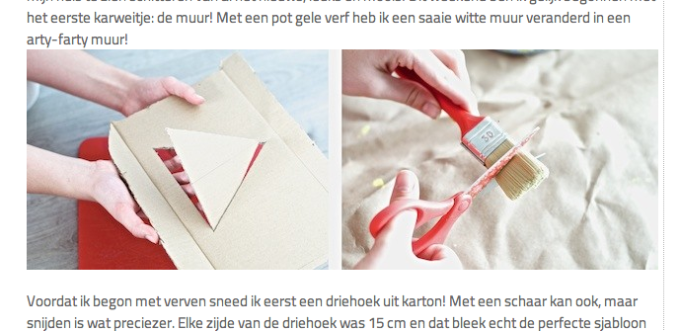
    The output is this: http://acupoflife.nl/wp-content/uploads/2013/07/Screen-Shot-2013-07-31-at-9.22.30-PM.png

    As you can see, in my input I've made sure that there were no spaces, paragraphs or whatever between the picture and the text. Now the question is:

    How can I manipulate the margins WordPress chooses for an image?
    The text above the picture has a margin of practically zero, while the margin on the bottom is huge, in my opinion. I'd like them to be the same margin, larger than the margin on top and smaller than the margin on the bottom.

    Actual post: http://acupoflife.nl/do-it-yourself/gele-driehoeken-verven/

    http://www.acupoflife.nl
    August 2, 2013 at 4:30 am #53699
    Brad Dalton
    Participant

    I would use Firebug to inspect the image and find the code used to add the margin and change that using a new CSS rule in Firebug so you can play around with it in real time using your browser before editing your style sheet.


    Tutorials for StudioPress Themes.

  • Author
    Posts
Viewing 2 posts - 1 through 2 (of 2 total)
  • The forum ‘Design Tips and Tricks’ is closed to new topics and replies.

CTA

Ready to get started? Create a site or shop for themes.

Create a site with WP EngineShop for Themes

Footer

StudioPress

© 2026 WPEngine, Inc.

Products
  • Create a Site with WP Engine
  • Shop for Themes
  • Theme Features
  • Get Started
  • Showcase
Company
  • Brand Assets
  • Terms of Service
  • Accptable Usse Policy
  • Privacy Policy
  • Refund Policy
  • Contact Us
Community
  • Find Developers
  • Forums
  • Facebook Group
  • #GenesisWP
  • Showcase
Resources
  • StudioPress Blog
  • Help & Documentation
  • FAQs
  • Code Snippets
  • Affiliates
Connect
  • StudioPress Live
  • StudioPress FM
  • Facebook
  • Twitter
  • Dribbble