• Skip to main content
  • Skip to forum navigation

StudioPress

  • Shop for Themes
  • My StudioPress

Forum navigation

  • Home
  • General Genesis Discussions
  • StudioPress Themes
  • Genesis Blocks
    • Genesis Blocks
    • Genesis Custom Blocks
  • Retired Themes
  • FAQs
  • Forum Rules
  • Internationalization and Translations
  • Forum Bugs and Suggestions
  • Forum Log In

Are You Using The WordPress Block Editor?

Genesis now offers plugins that help you build better sites faster with the WordPress block editor (Gutenberg). Try the feature-rich free versions of each plugin for yourself!

Genesis Blocks Genesis Custom Blocks

Headers widgets out of place in mobile view

Welcome!

These forums are for general discussion on WordPress and Genesis. Official support for StudioPress themes is offered exclusively at My StudioPress. Responses in this forum are not guaranteed. Please note that this forum will require a new username, separate from the one used for My.StudioPress.

Log In
Register Lost Password

Community Forums › Forums › Archived Forums › Design Tips and Tricks › Headers widgets out of place in mobile view

This topic is: not resolved

Tagged: header, mobile, runway, view, widgets

  • This topic has 4 replies, 4 voices, and was last updated 12 years, 1 month ago by lwlindquist.
Viewing 5 posts - 1 through 5 (of 5 total)
  • Author
    Posts
  • September 25, 2013 at 3:07 pm #64156
    jdsmit21
    Member

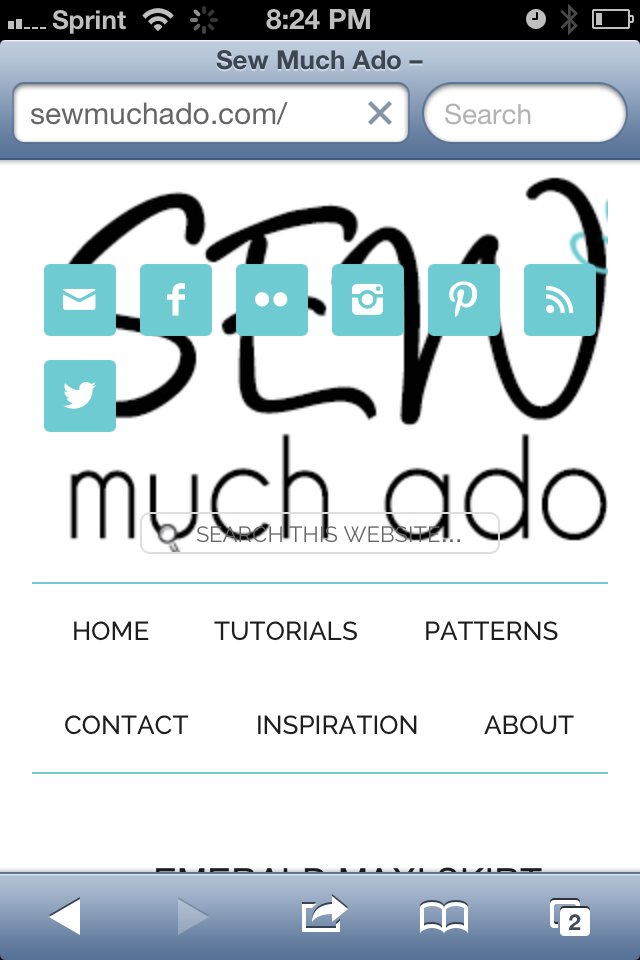
    Hi, I'm using the Runway Theme and have search and social icons widgets to the right of my header logo. In mobile view, those widgets overlap the logo. Any thoughts on how I can fix this so the widgets are not placed over my header logo in mobile view? I'm fairly new to WP, and have searched the forums and can't seem to figure it out. Thanks!

    September 25, 2013 at 3:35 pm #64160
    AnitaC
    Keymaster

    Please share a link to your website so we can take a look.


    Need help with customization or troubleshooting? Reach out to me.

    September 25, 2013 at 9:31 pm #64238
    jdsmit21
    Member

    The blog is in maintenance mode, but here is a link to the screenshot when viewed on an iPhone: http://i807.photobucket.com/albums/yy351/jdsmit21/Screenshots/mobilescreenshot.png

    October 21, 2013 at 5:40 am #67985
    jamesalex
    Member

    I am having the same issue, I cannot see why the two areas are overlapping one another.

    I have joined the thread in the hop the answer will be available soon

    Thanks
    Jamie

    October 30, 2013 at 7:04 am #69875
    lwlindquist
    Member

    Was having a similar problem and resolved it by adjusting the header right widget area width in the responsive section of the css.

    This thread may be of help to you. http://www.studiopress.community/topic/header-right-widget-overlaps-logo-image-in-metro-pro/

  • Author
    Posts
Viewing 5 posts - 1 through 5 (of 5 total)
  • The forum ‘Design Tips and Tricks’ is closed to new topics and replies.

CTA

Ready to get started? Create a site or shop for themes.

Create a site with WP EngineShop for Themes

Footer

StudioPress

© 2025 WPEngine, Inc.

Products
  • Create a Site with WP Engine
  • Shop for Themes
  • Theme Features
  • Get Started
  • Showcase
Company
  • Brand Assets
  • Terms of Service
  • Accptable Usse Policy
  • Privacy Policy
  • Refund Policy
  • Contact Us
Community
  • Find Developers
  • Forums
  • Facebook Group
  • #GenesisWP
  • Showcase
Resources
  • StudioPress Blog
  • Help & Documentation
  • FAQs
  • Code Snippets
  • Affiliates
Connect
  • StudioPress Live
  • StudioPress FM
  • Facebook
  • Twitter
  • Dribbble