• Skip to main content
  • Skip to forum navigation

StudioPress

  • Shop for Themes
  • My StudioPress

Forum navigation

  • Home
  • General Genesis Discussions
  • StudioPress Themes
  • Genesis Blocks
    • Genesis Blocks
    • Genesis Custom Blocks
  • Retired Themes
  • FAQs
  • Forum Rules
  • Internationalization and Translations
  • Forum Bugs and Suggestions
  • Forum Log In

Are You Using The WordPress Block Editor?

Genesis now offers plugins that help you build better sites faster with the WordPress block editor (Gutenberg). Try the feature-rich free versions of each plugin for yourself!

Genesis Blocks Genesis Custom Blocks

header background, Focus

Welcome!

These forums are for general discussion on WordPress and Genesis. Official support for StudioPress themes is offered exclusively at My StudioPress. Responses in this forum are not guaranteed. Please note that this forum will require a new username, separate from the one used for My.StudioPress.

Log In
Register Lost Password

Community Forums › Forums › Archived Forums › Design Tips and Tricks › header background, Focus

This topic is: resolved

Tagged: background image, focus, header

  • This topic has 2 replies, 2 voices, and was last updated 10 years, 4 months ago by saralaughs.
Viewing 3 posts - 1 through 3 (of 3 total)
  • Author
    Posts
  • October 15, 2015 at 4:06 pm #168233
    saralaughs
    Member

    I have been trying to get this to work for a long time -- I posted here previously and made changes on that basis, but it is still evading me. I 've experimented with endlessly with the theme customization screens and custom css on the child theme, but still come up short.

    At this point I realize I may have to pay somebody to sort this out for me, but I thought it was worth one more try.

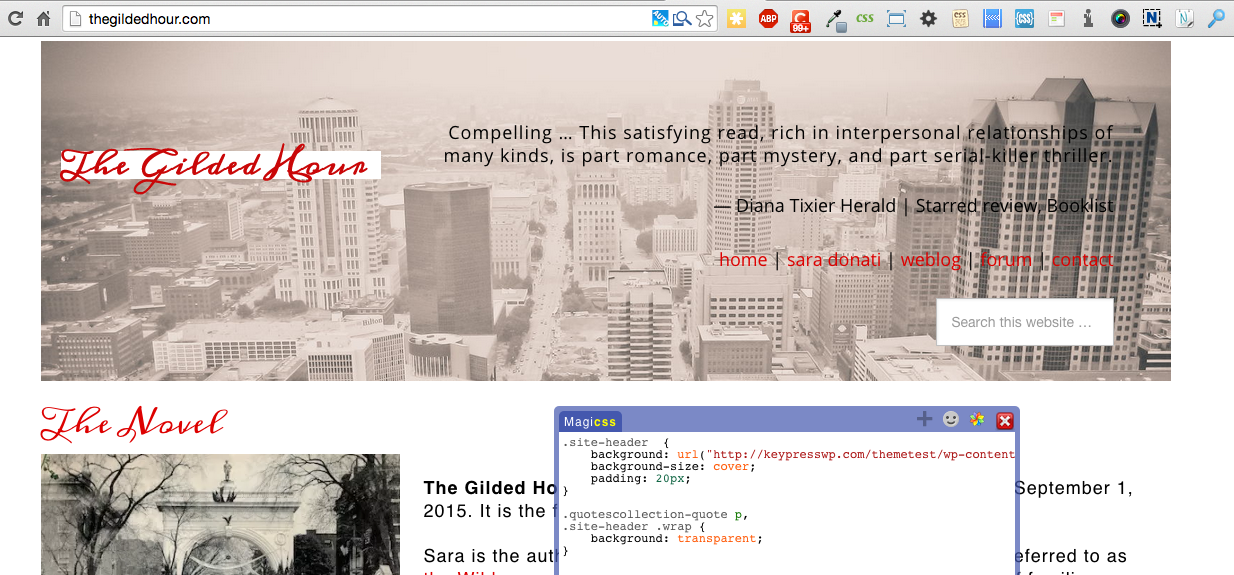
    If you compare the site as it is now and then look at what I'm trying to achieve, here maybe something terribly obvious I've missed will jump out at you.

    Note: in the lower right you're seeing two widgets, one with the random quotation plugin, the other plain text.

    http://thegildedhour.com
    October 17, 2015 at 5:07 pm #168351
    Tom
    Participant

    Heya,

    This can be done with some CSS and a new, transparent title (text) image, perhaps some additional detailing.

    Mine:

    .site-header  {
    	background: url("http://keypresswp.com/themetest/wp-content/uploads/2015/unsplash-00227-1600.jpg");
    	background-size: cover;
    	padding: 20px;
    }
    
    .quotescollection-quote p,
    .site-header .wrap {
    	background: transparent;
    }

    Yours:


    Choose your next site design from over 350 Genesis themes.
    [ Follow me: Twitter ] [ Follow Themes: Twitter ] [ My Favourite Webhost ]

    October 17, 2015 at 5:30 pm #168353
    saralaughs
    Member

    Tom!!

    Thank you. THANK you. I knew it had to be fairly straight forward but I just couldn't make it happen.

    r/s

  • Author
    Posts
Viewing 3 posts - 1 through 3 (of 3 total)
  • The forum ‘Design Tips and Tricks’ is closed to new topics and replies.

CTA

Ready to get started? Create a site or shop for themes.

Create a site with WP EngineShop for Themes

Footer

StudioPress

© 2026 WPEngine, Inc.

Products
  • Create a Site with WP Engine
  • Shop for Themes
  • Theme Features
  • Get Started
  • Showcase
Company
  • Brand Assets
  • Terms of Service
  • Accptable Usse Policy
  • Privacy Policy
  • Refund Policy
  • Contact Us
Community
  • Find Developers
  • Forums
  • Facebook Group
  • #GenesisWP
  • Showcase
Resources
  • StudioPress Blog
  • Help & Documentation
  • FAQs
  • Code Snippets
  • Affiliates
Connect
  • StudioPress Live
  • StudioPress FM
  • Facebook
  • Twitter
  • Dribbble