• Skip to main content
  • Skip to forum navigation

StudioPress

  • Shop for Themes
  • My StudioPress

Forum navigation

  • Home
  • General Genesis Discussions
  • StudioPress Themes
  • Genesis Blocks
    • Genesis Blocks
    • Genesis Custom Blocks
  • Retired Themes
  • FAQs
  • Forum Rules
  • Internationalization and Translations
  • Forum Bugs and Suggestions
  • Forum Log In

Are You Using The WordPress Block Editor?

Genesis now offers plugins that help you build better sites faster with the WordPress block editor (Gutenberg). Try the feature-rich free versions of each plugin for yourself!

Genesis Blocks Genesis Custom Blocks

fabric8ted header links

Welcome!

These forums are for general discussion on WordPress and Genesis. Official support for StudioPress themes is offered exclusively at My StudioPress. Responses in this forum are not guaranteed. Please note that this forum will require a new username, separate from the one used for My.StudioPress.

Log In
Register Lost Password

Community Forums › Forums › Archived Forums › Design Tips and Tricks › fabric8ted header links

This topic is: resolved

Tagged: code css html fabric8ted

  • This topic has 6 replies, 2 voices, and was last updated 12 years, 3 months ago by Mary OBrien.
Viewing 7 posts - 1 through 7 (of 7 total)
  • Author
    Posts
  • September 30, 2013 at 5:40 pm #64862
    Mary OBrien
    Member

    Hello everyone.

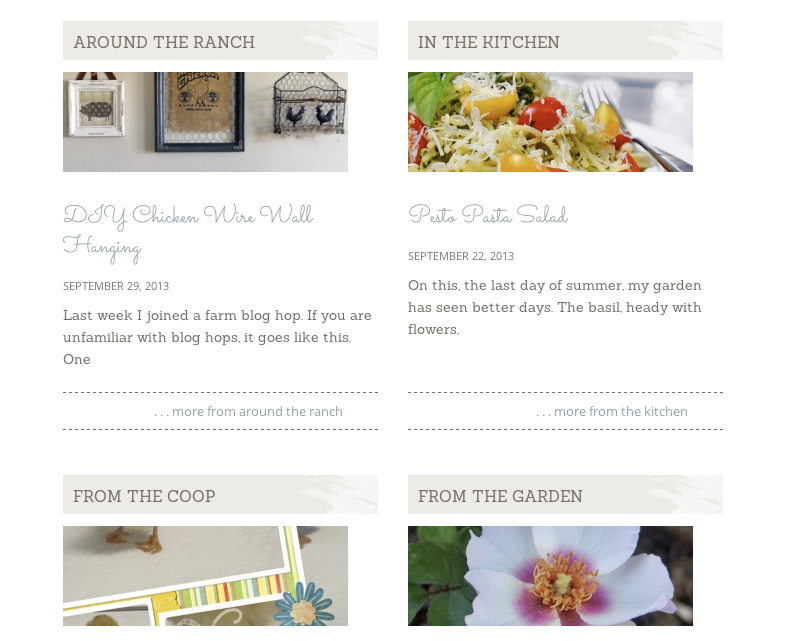
    I am trying to make the headers on my home page 'links' but can't find the code to insert the 'link code' within my theme. Could someone point me in the right direction to finding the code for the headers "Around the ranch" "In the kitchen" "From the coop" "From the garden" etc.....??

    http://www.bucknrunranch.com

    Thank you
    Mary

    http://www.bucknrunranch.com
    September 30, 2013 at 6:11 pm #64869
    AnitaC
    Keymaster

    You need to install the Genesis Featured Widget Amplified to have that functionality. It's a setting right inside the widget.


    Need help with customization or troubleshooting? Reach out to me.

    September 30, 2013 at 7:46 pm #64882
    Mary OBrien
    Member

    Thanks anitac. I installed that and it looks like it should allow me to add a custom link to the thumbnail, however, when I put in a URL in that setting, it does not override the permalink. I did not find any setting to allow the 'title' to be a link.

    any ideas?

    Mary

    September 30, 2013 at 7:52 pm #64883
    AnitaC
    Keymaster

    Oh I misunderstood you. I thought you wanted the title header to link to the post/page. So you want to put a link that routes it to a totally different URL?


    Need help with customization or troubleshooting? Reach out to me.

    September 30, 2013 at 8:00 pm #64884
    Mary OBrien
    Member

    Yes, would like the title OR thumbnail to link to the 'archives' page for that category

    September 30, 2013 at 8:12 pm #64890
    AnitaC
    Keymaster

    I don't think there's a widget code that will do that. I first thought about a URL redirect, but if you did that, then if they clicked it from the Category, it would stay on that page. There is a setting in the widget to show the category for that post - that won't work for you?


    Need help with customization or troubleshooting? Reach out to me.

    September 30, 2013 at 8:23 pm #64892
    Mary OBrien
    Member

    The Show archive link is exactly what I am looking for, only it is more natural for visitors to click on the 'header' or 'thumbnail' to get there. I'm not sure why the 'custom field for link' doesn't work. I'll keep working on it 😉

  • Author
    Posts
Viewing 7 posts - 1 through 7 (of 7 total)
  • The forum ‘Design Tips and Tricks’ is closed to new topics and replies.

CTA

Ready to get started? Create a site or shop for themes.

Create a site with WP EngineShop for Themes

Footer

StudioPress

© 2026 WPEngine, Inc.

Products
  • Create a Site with WP Engine
  • Shop for Themes
  • Theme Features
  • Get Started
  • Showcase
Company
  • Brand Assets
  • Terms of Service
  • Accptable Usse Policy
  • Privacy Policy
  • Refund Policy
  • Contact Us
Community
  • Find Developers
  • Forums
  • Facebook Group
  • #GenesisWP
  • Showcase
Resources
  • StudioPress Blog
  • Help & Documentation
  • FAQs
  • Code Snippets
  • Affiliates
Connect
  • StudioPress Live
  • StudioPress FM
  • Facebook
  • Twitter
  • Dribbble