• Skip to main content
  • Skip to forum navigation

StudioPress

  • Shop for Themes
  • My StudioPress

Forum navigation

  • Home
  • General Genesis Discussions
  • StudioPress Themes
  • Genesis Blocks
    • Genesis Blocks
    • Genesis Custom Blocks
  • Retired Themes
  • FAQs
  • Forum Rules
  • Internationalization and Translations
  • Forum Bugs and Suggestions
  • Forum Log In

Are You Using The WordPress Block Editor?

Genesis now offers plugins that help you build better sites faster with the WordPress block editor (Gutenberg). Try the feature-rich free versions of each plugin for yourself!

Genesis Blocks Genesis Custom Blocks

Comments button in Metro Pro homepage can't be customized

Welcome!

These forums are for general discussion on WordPress and Genesis. Official support for StudioPress themes is offered exclusively at My StudioPress. Responses in this forum are not guaranteed. Please note that this forum will require a new username, separate from the one used for My.StudioPress.

Log In
Register Lost Password

Community Forums › Forums › Archived Forums › Design Tips and Tricks › Comments button in Metro Pro homepage can't be customized

This topic is: not resolved

Tagged: comment translation, Metro Pro

  • This topic has 6 replies, 2 voices, and was last updated 12 years, 2 months ago by isasema.
Viewing 7 posts - 1 through 7 (of 7 total)
  • Author
    Posts
  • May 7, 2014 at 5:02 pm #104092
    isasema
    Member

    Hi:

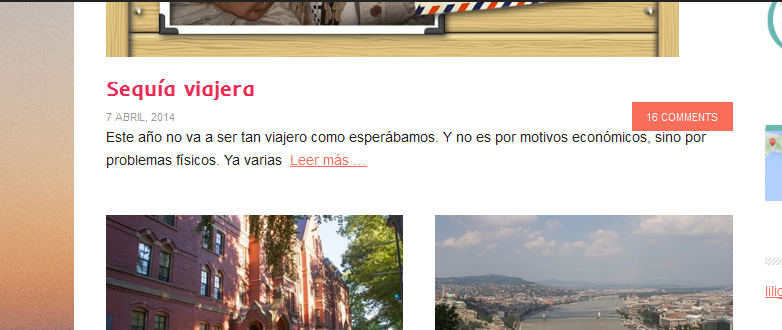
    I am trying to customize the text of the comments in Metro Pro and translate them to Spanish. I have been able to change the button text inside a post and also de Comments form. But the text in the homepage won't change no matter what I do.

    Any feedback?

    Thanks.

    http://locosxlo-cp84.wordpresstemporal.com/
    May 8, 2014 at 9:57 pm #104242
    Tom
    Participant

    The buttons appear in Spanish for me ("16 COMENTARIOS") - at least until Google translates them.

    Please post again if you have additional questions or mark your thread as resolved if things are OK.


    Choose your next site design from over 350 Genesis themes.
    [ Follow me: Twitter ] [ Follow Themes: Twitter ] [ My Favourite Webhost ]

    May 9, 2014 at 4:06 am #104269
    isasema
    Member

    Hi Tom.

    Nope, it still shows in the homepage, not inside the post.

    Look here: http://locosxlo-cp84.wordpresstemporal.com/

    May 9, 2014 at 11:49 am #104308
    Tom
    Participant

    The Metro Pro theme does not present comment label or buttons on the home page. The only English text I can see on the home page is in the search box ("Search this website...") and in the footer (copyright throughout login items). The meta labels on the blog page are also in English ('filed under'/'tagged with')

    The comment label on the blog page and all comment labels on posts is presented in Spanish. Everywhere it is "COMENTARIOS".

    Perhaps I am missing something or miscommunicating - please post a screen capture of the problem text area.

    Also, I just noticed your domain name "wordpresstemporal.com" - Did you know that this is in violation of the WordPress Foundation Trademark Policy? That’s probably something you should take care of.

    Under no circumstances is it permitted to use WordPress or WordCamp as part of a top-level domain name.


    Choose your next site design from over 350 Genesis themes.
    [ Follow me: Twitter ] [ Follow Themes: Twitter ] [ My Favourite Webhost ]

    May 9, 2014 at 2:30 pm #104334
    isasema
    Member

    Hi:

    This is not my domain, it is my client's.

    She has a temporary URL while migrating and designing the site, before we move it to her main domain. Her hosting provider gave it to her.

    I am posting a screenshot I just took

    Comments

    May 9, 2014 at 3:56 pm #104340
    Tom
    Participant

    I am posting a screenshot I just took:

    Full image: http://oi58.tinypic.com/b93zd.jpg


    Choose your next site design from over 350 Genesis themes.
    [ Follow me: Twitter ] [ Follow Themes: Twitter ] [ My Favourite Webhost ]

    May 9, 2014 at 4:13 pm #104342
    isasema
    Member

    Thanks Tom. I see it now just like you.

    🙂

  • Author
    Posts
Viewing 7 posts - 1 through 7 (of 7 total)
  • The forum ‘Design Tips and Tricks’ is closed to new topics and replies.

CTA

Ready to get started? Create a site or shop for themes.

Create a site with WP EngineShop for Themes

Footer

StudioPress

© 2026 WPEngine, Inc.

Products
  • Create a Site with WP Engine
  • Shop for Themes
  • Theme Features
  • Get Started
  • Showcase
Company
  • Brand Assets
  • Terms of Service
  • Accptable Usse Policy
  • Privacy Policy
  • Refund Policy
  • Contact Us
Community
  • Find Developers
  • Forums
  • Facebook Group
  • #GenesisWP
  • Showcase
Resources
  • StudioPress Blog
  • Help & Documentation
  • FAQs
  • Code Snippets
  • Affiliates
Connect
  • StudioPress Live
  • StudioPress FM
  • Facebook
  • Twitter
  • Dribbble