• Skip to main content
  • Skip to forum navigation

StudioPress

  • Shop for Themes
  • My StudioPress

Forum navigation

  • Home
  • General Genesis Discussions
  • StudioPress Themes
  • Genesis Blocks
    • Genesis Blocks
    • Genesis Custom Blocks
  • Retired Themes
  • FAQs
  • Forum Rules
  • Internationalization and Translations
  • Forum Bugs and Suggestions
  • Forum Log In

Are You Using The WordPress Block Editor?

Genesis now offers plugins that help you build better sites faster with the WordPress block editor (Gutenberg). Try the feature-rich free versions of each plugin for yourself!

Genesis Blocks Genesis Custom Blocks

Centering Split Menu and Logo

Welcome!

These forums are for general discussion on WordPress and Genesis. Official support for StudioPress themes is offered exclusively at My StudioPress. Responses in this forum are not guaranteed. Please note that this forum will require a new username, separate from the one used for My.StudioPress.

Log In
Register Lost Password

Community Forums › Forums › Archived Forums › Design Tips and Tricks › Centering Split Menu and Logo

This topic is: not resolved

Tagged: Modern Portfolio theme, navigation

  • This topic has 4 replies, 3 voices, and was last updated 11 years, 9 months ago by suburbanite.
Viewing 5 posts - 1 through 5 (of 5 total)
  • Author
    Posts
  • June 12, 2014 at 6:44 am #109468
    suburbanite
    Member

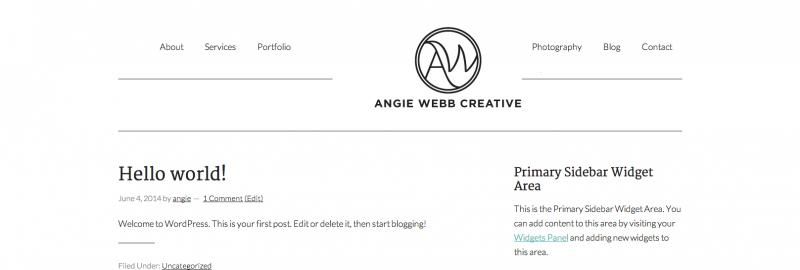
    Hi there! I am looking to split my navigation menu (Modern Portfolio Theme) between left and right and have it centered with the logo in the center of everything. I used this tutorial to get it set up, and it seems to be working; this tutorial

    However, the menu isn't entirely centered, and neither is the logo. Also, the lines that are supposed to border the top and bottom of the menu are now way too low.

    Unfortunately, I'm running the site locally, so I can't provide the URL, but

    here is a screenshot

    I appreciate your help in advance!

    June 16, 2014 at 8:07 pm #110089
    rfmeier
    Member

    Are you able to edit the css within the browser? Kinda hard to diagnose from a far.


    Ryan Meier – Twitter

    June 17, 2014 at 12:13 pm #110217
    suburbanite
    Member

    Right now everything is offline. Is there an easy way to export everything and get it up on a live WP account?

    June 17, 2014 at 4:51 pm #110282
    badlydrawnben
    Member

    Instead of that method that uses two different menus (primary and secondary), you could use this plugin which allows you to just use the primary menu. http://mattkeys.me/products/wp-nav-plus/

    I have it and I find it really useful for the sidebar nav menus it makes as well.

    That might solve your problem a bit better?

    August 16, 2014 at 7:08 am #119187
    suburbanite
    Member

    Thanks, I will try that!

  • Author
    Posts
Viewing 5 posts - 1 through 5 (of 5 total)
  • The forum ‘Design Tips and Tricks’ is closed to new topics and replies.

CTA

Ready to get started? Create a site or shop for themes.

Create a site with WP EngineShop for Themes

Footer

StudioPress

© 2026 WPEngine, Inc.

Products
  • Create a Site with WP Engine
  • Shop for Themes
  • Theme Features
  • Get Started
  • Showcase
Company
  • Brand Assets
  • Terms of Service
  • Accptable Usse Policy
  • Privacy Policy
  • Refund Policy
  • Contact Us
Community
  • Find Developers
  • Forums
  • Facebook Group
  • #GenesisWP
  • Showcase
Resources
  • StudioPress Blog
  • Help & Documentation
  • FAQs
  • Code Snippets
  • Affiliates
Connect
  • StudioPress Live
  • StudioPress FM
  • Facebook
  • Twitter
  • Dribbble