• Skip to main content
  • Skip to forum navigation

StudioPress

  • Shop for Themes
  • My StudioPress

Forum navigation

  • Home
  • General Genesis Discussions
  • StudioPress Themes
  • Genesis Blocks
    • Genesis Blocks
    • Genesis Custom Blocks
  • Retired Themes
  • FAQs
  • Forum Rules
  • Internationalization and Translations
  • Forum Bugs and Suggestions
  • Forum Log In

Are You Using The WordPress Block Editor?

Genesis now offers plugins that help you build better sites faster with the WordPress block editor (Gutenberg). Try the feature-rich free versions of each plugin for yourself!

Genesis Blocks Genesis Custom Blocks

Blog Page Formatting

Welcome!

These forums are for general discussion on WordPress and Genesis. Official support for StudioPress themes is offered exclusively at My StudioPress. Responses in this forum are not guaranteed. Please note that this forum will require a new username, separate from the one used for My.StudioPress.

Log In
Register Lost Password

Community Forums › Forums › Archived Forums › General Discussion › Blog Page Formatting

This topic is: resolved
  • This topic has 1 reply, 2 voices, and was last updated 9 years, 11 months ago by Victor Font.
Viewing 2 posts - 1 through 2 (of 2 total)
  • Author
    Posts
  • September 7, 2016 at 9:24 pm #192802
    plentyvegan
    Member

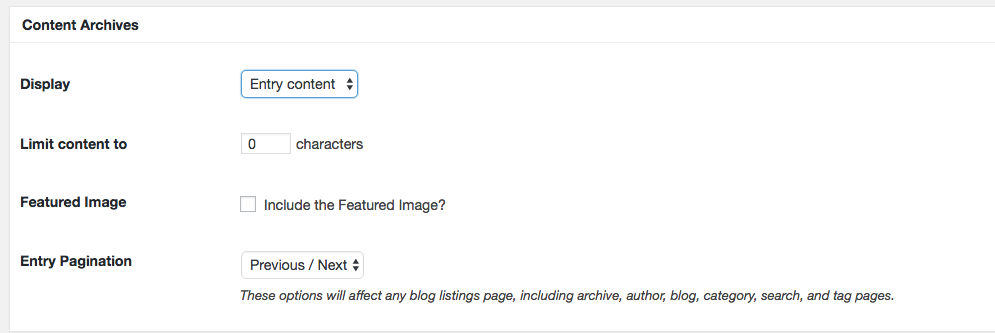
    I am trying to show the most recent blog post, in its entirety and formatted correctly, on the landing page for the blog on my site. Right now, it seems that all I can do is edit the content archives settings of Genesis Settings to prevent it from limiting characters and have it show only 1 blog post. However, this messes with the formatting on some of my posts.

    For example, the recipe at the end of this post is not formatted correctly (as it is if you click into the post itself by clicking the title): http://plentyvegan.com/blog/page/2/

    The theme settings for content archives as described here do not match my settings: http://my.studiopress.com/setup/agency-pro-theme/genesis-theme-settings/genesis-theme-settings/

    Content Archives Settings

    I do not have the option to "Display post content" but only display "entry content" or "entry excerpts". Not sure if that matters...

    http://plentyvegan.com/blog
    September 8, 2016 at 5:21 am #192813
    Victor Font
    Moderator

    Entry content is post content.

    This is not a Genesis issue, this is standard WordPress behavior. WordPress removes most html formatting for archive pages. http://wpsites.net/wordpress-tips/add-back-html-tags-stripped-from-content-limit-excerpts-in-wordpress/


    Regards,

    Victor
    https://victorfont.com/
    Call us toll free: 844-VIC-FONT (842-3668)
    Have you requested your free website audit yet?

  • Author
    Posts
Viewing 2 posts - 1 through 2 (of 2 total)
  • The forum ‘General Discussion’ is closed to new topics and replies.

CTA

Ready to get started? Create a site or shop for themes.

Create a site with WP EngineShop for Themes

Footer

StudioPress

© 2026 WPEngine, Inc.

Products
  • Create a Site with WP Engine
  • Shop for Themes
  • Theme Features
  • Get Started
  • Showcase
Company
  • Brand Assets
  • Terms of Service
  • Accptable Usse Policy
  • Privacy Policy
  • Refund Policy
  • Contact Us
Community
  • Find Developers
  • Forums
  • Facebook Group
  • #GenesisWP
  • Showcase
Resources
  • StudioPress Blog
  • Help & Documentation
  • FAQs
  • Code Snippets
  • Affiliates
Connect
  • StudioPress Live
  • StudioPress FM
  • Facebook
  • Twitter
  • Dribbble