Community Forums › Forums › Archived Forums › Design Tips and Tricks › Adding graphics between widgets and posts
- This topic has 10 replies, 2 voices, and was last updated 9 years, 8 months ago by
wickedsimple.
-
AuthorPosts
-
August 18, 2014 at 4:45 am #119504
wickedsimple
MemberI am using the Lifestyle theme and I would like to put some graphics in between the different sections on the home page (main featured image, next block of two posts, then last block of 4 posts) and also between the widgets on the sidebar. Please see this link for a reference of what I would like to do: http://citycookin.com
How do I do this? My url is http://www.analisamendmentblog.com and the theme is Lifestyle. (I am just starting to build this out so it looks pretty rough right now! LOL!)
Thank you in advance!
Donna
http://www.analisamendmentblog.comAugust 18, 2014 at 6:46 am #119514Ben @ Inbound Creative
MemberDo you mean like about the featured box is a frying pan?
August 18, 2014 at 7:21 am #119517MemberHi Ben,
That probably wasn't the best example, now that I look at it!
See this site: http://fiveandspice.com
I like how there is a graphic (in this case, a graphic that's a line) in between the different blog posts and also in between the widgets on the side bar. I would like to be able to do that.
I also love the graphic that is in front of each blog post title.
Thanks!
Donna
August 18, 2014 at 7:36 am #119518MemberAh, okay.
That's not too difficult. You would – however – need to find your own graphics to do this. Using either of those sites' graphics would be stealing as they'll have either created them themselves/outsourced it or paid a licence fee.
In terms of the widgets, you'd need to add this code to the relevant classes (or add them):
.widget-title {
	background-image: url('xxx');
	background-repeat: no-repeat;
}
h4.widget-title { background-position: 0 20px; }Place your image's url where the three xxxs are.
Obviously, the background position's second value may need to be changed based on the size of the image.
August 18, 2014 at 7:42 am #119520MemberAs for the headline, use this:
h1.entry-title {
	background-image: url('xxx');
	background-repeat: no-repeat;
	background-position: -xpx -xpx; /* Make these what ever it takes to position the image here you want it. */
	padding-left: xpx; /* Width of the background image plus some for space */
	padding-top: xpx; /* If necessary – might not be, otherwise 0 it */
	height: xpx; /* Height of the image – you may need to use !important on the height */
}
August 18, 2014 at 8:21 am #119531MemberThanks so much, Ben. I am going to be creating custom graphics once I design the new logo.
For this example, I created a really quick graphic to use. But I can't get it to fit the correct way. This is the CSS I added:
.widget-title {
background-image: url('http://www.analisamendmentblog.com/wp-content/uploads/2014/08/samplegraphic.png');
background-repeat: no-repeat;
}
h4.widget-title {
background-position: 0px -15px;
}I have played around with the background position and cannot get the image to be centered below the widget title.
Perhaps instead of doing it this way, can I put the sample graphic in between each widget "container"? See the sample cupcake that I have inserted in a text widget above the newsletter sign up box. Maybe put it there but without having the box around it??
Thanks for all of your help!
August 18, 2014 at 8:28 am #119535MemberThat's a simple fix. Change the h4.widget-title text to say:
h4.widget-title {
   background-position: 50% 30px;
   height: 75px;
}
The background position controls where the background image appears – not the text.
The height just makes sure there is enough room for the image to appear with some space under the next to make sure it remains legible.
August 18, 2014 at 8:38 am #119539MemberAhhh……briliant! Thank you!
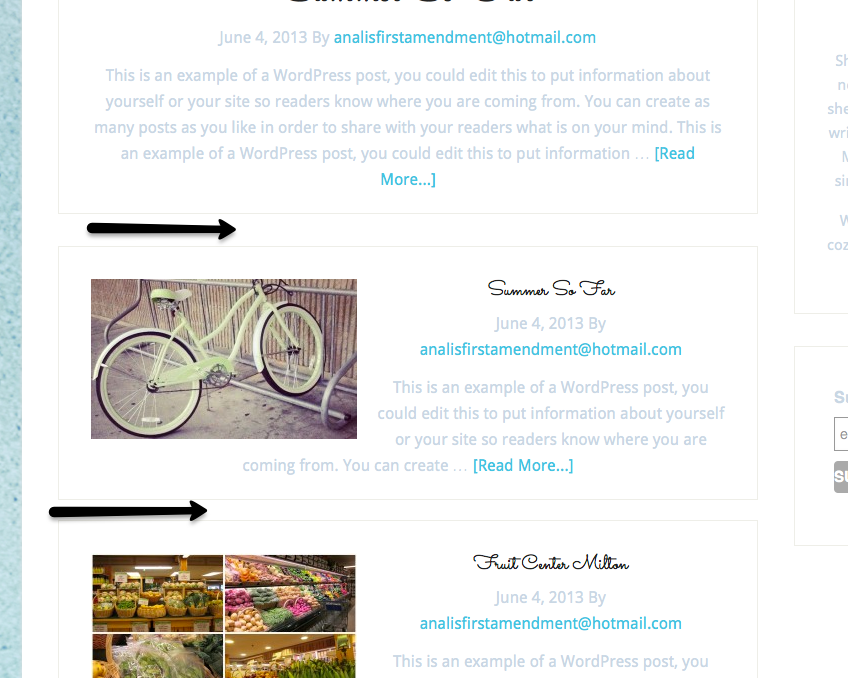
Now one other item….I would like to put a graphic to serve as a divider between the blog posts on the home page. See the attached screen shot.
How would I do that?
Thanks again for all of your help!
Donna
 August 18, 2014 at 8:49 am #119541Member
This one's a little different.
You'll need to add a class in your css file.
.home .featured-content .post {
   position: relative;
}
.home .featured-content .post:after { position: absolute; content: url('http://www.analisamendmentblog.com/wp-content/uploads/2014/08/samplegraphic.png'') no-repeat; left: 50%; margin-left: 78px; }It might need some tweaking code wise once it's up. Post here once it's live and I'll give you the final amendment.
August 18, 2014 at 9:13 am #119542MemberHmm…that didn't seem to do anything. I wonder if it's the way the Lifestyle Pro theme is set up with widget for the Home Top, Home Middle, Home Left, Home Right instead of it being just a blogroll?
August 18, 2014 at 9:16 am #119543MemberI was able to add a text widget in the Home Top widget with an image and it looks like this will work!
-
AuthorPosts
- The forum ‘Design Tips and Tricks’ is closed to new topics and replies.