• Skip to main content
  • Skip to forum navigation

StudioPress

  • Shop for Themes
  • My StudioPress

Forum navigation

  • Home
  • General Genesis Discussions
  • StudioPress Themes
  • Genesis Blocks
    • Genesis Blocks
    • Genesis Custom Blocks
  • Retired Themes
  • FAQs
  • Forum Rules
  • Internationalization and Translations
  • Forum Bugs and Suggestions
  • Forum Log In

Are You Using The WordPress Block Editor?

Genesis now offers plugins that help you build better sites faster with the WordPress block editor (Gutenberg). Try the feature-rich free versions of each plugin for yourself!

Genesis Blocks Genesis Custom Blocks

asoon

Welcome!

These forums are for general discussion on WordPress and Genesis. Official support for StudioPress themes is offered exclusively at My StudioPress. Responses in this forum are not guaranteed. Please note that this forum will require a new username, separate from the one used for My.StudioPress.

Log In
Register Lost Password
  • Profile
  • Topics Started
  • Replies Created
  • Engagements
  • Favorites

Forum Replies Created

Viewing 16 posts - 1 through 16 (of 16 total)
  • Author
    Posts
  • March 27, 2017 at 10:14 pm in reply to: Can’t remove underline for some reason #203938
    asoon
    Member

    Thanks Victor, I managed to find the offending CSS and fix it (finally!).

    March 22, 2017 at 2:16 am in reply to: Can’t remove underline for some reason #203626
    asoon
    Member

    Pinging this back up once, in case somebody can help me.

    March 15, 2017 at 8:06 pm in reply to: Can’t remove underline for some reason #203171
    asoon
    Member

    Hi Victor,

    Thanks for the suggestion. That's the challenge, the links in body text have underlines, but they're removed on mouse-over. That doesn't happen with the 'Read Later' links -- and I can't seem to find the right selector.

    I've disabled the Autooptimize plugin, would this make it easier to see my CSS?

    January 22, 2017 at 11:49 pm in reply to: Feedback on readability please (based on Wellness Pro theme) #199829
    asoon
    Member

    Thank you Erika, that’s good to hear!

    January 19, 2017 at 2:52 am in reply to: Wellness Pro — Are dashicons only black? #199639
    asoon
    Member

    Thank you so much to you both! I've managed to fix it now.

    January 4, 2017 at 7:29 pm in reply to: How to have newsletter sign-up form before Jetpack’s ‘Related Posts’? #198774
    asoon
    Member

    Thanks Brad,

    How can I do that? I'm pretty much a beginner at this. Are there any tutorials I can look at?

    January 2, 2017 at 9:12 pm in reply to: How to add 'discs' to this list? #198653
    asoon
    Member

    Thank you so much Victor, it works perfectly now.

    December 21, 2016 at 8:14 pm in reply to: Wellness Pro: How to remove ‘Blog’ page title, and a problem with images #197968
    asoon
    Member

    Thank you Lynne, I've fixed the h3 tag now.

    I still have the problem with the large 'Blog' page title showing, anyone has an idea on how I can remove it?

    Here's the page: http://8a2.257.mwp.accessdomain.com/articles/

    November 27, 2016 at 8:10 pm in reply to: Wellness Pro: Images larger width than text width? #196705
    asoon
    Member

    P.S. I'm trying to achieve something like this, from WordPress' Twenty Sixteen theme. Would it be too much work to do?
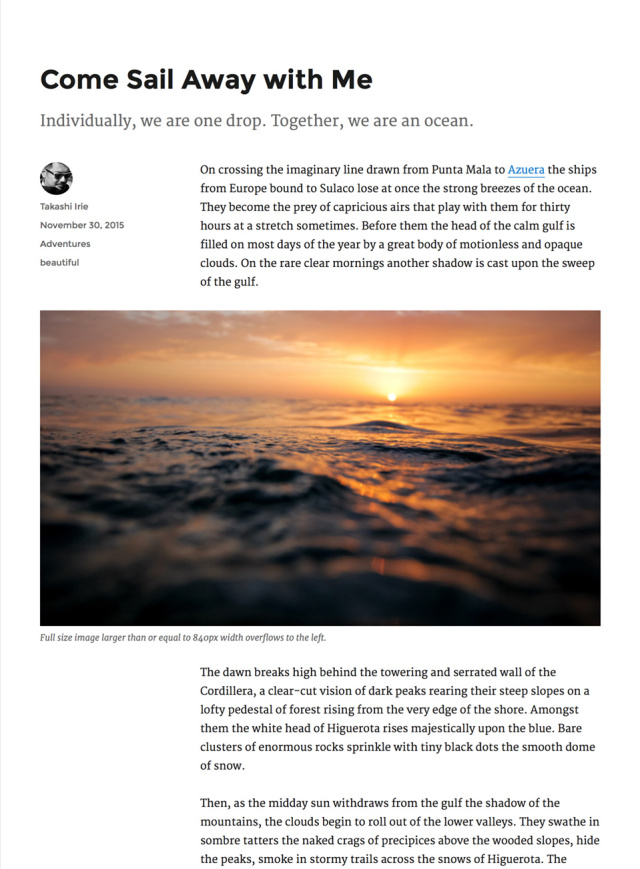
    Overhang image example

    December 3, 2015 at 7:59 pm in reply to: Ambiance Pro: Featured images are low-res #172666
    asoon
    Member

    I'll do that. Thanks Mike!

    December 2, 2015 at 7:50 pm in reply to: Ambiance Pro: Featured images are low-res #172550
    asoon
    Member

    Thanks Mike! Glad you like it.

    I'm looking at the setting now, and there's an additional one that says displayfeaturedimage_backstretch (2000 x 2000). Which setting is better for me? I have no idea what each means.

    Alvin

    November 19, 2015 at 8:00 pm in reply to: Ambiance Pro: How to reduce white space between header and Welcome Message widge #171595
    asoon
    Member

    Sorry, I managed to solve this.

    November 17, 2015 at 9:10 pm in reply to: Ambiance Pro: How to darken grid images using CSS #171368
    asoon
    Member

    Ah, sorry. It seems to be fixed now, after I turned off the Subtitles plugin.

    November 16, 2015 at 6:14 am in reply to: Ambiance Pro: How to darken grid images using CSS #171250
    asoon
    Member

    Oops, now there are odd grey bars that appear when I resize the browser. Here's a screenshot:

    Grey bars

    I think it might have to do with the modification, because it doesn't seem to appear in the Ambiance Pro demo.

    Help, please?

    November 15, 2015 at 12:08 am in reply to: ambiance pro: remove date from home page #171139
    asoon
    Member

    Hello,

    I'd like to know how to do this too. This is my staging site:

    http://b7a.98a.myftpupload.com/

    Suggestions please?

    November 14, 2015 at 9:30 pm in reply to: Ambiance Pro: How to darken grid images using CSS #171129
    asoon
    Member

    Thank you! That worked perfectly.

  • Author
    Posts
Viewing 16 posts - 1 through 16 (of 16 total)

CTA

Ready to get started? Create a site or shop for themes.

Create a site with WP EngineShop for Themes

Footer

StudioPress

© 2026 WPEngine, Inc.

Products
  • Create a Site with WP Engine
  • Shop for Themes
  • Theme Features
  • Get Started
  • Showcase
Company
  • Brand Assets
  • Terms of Service
  • Accptable Usse Policy
  • Privacy Policy
  • Refund Policy
  • Contact Us
Community
  • Find Developers
  • Forums
  • Facebook Group
  • #GenesisWP
  • Showcase
Resources
  • StudioPress Blog
  • Help & Documentation
  • FAQs
  • Code Snippets
  • Affiliates
Connect
  • StudioPress Live
  • StudioPress FM
  • Facebook
  • Twitter
  • Dribbble