Community Forums › Forums › Archived Forums › General Discussion › Understanding CSS for my Child Theme
Tagged: css, learning, lifestylepro, Wordpress Site labels
- This topic has 2 replies, 2 voices, and was last updated 10 years, 11 months ago by
strifemit.
-
AuthorPosts
-
September 28, 2015 at 6:48 pm #166905
strifemit
MemberHi
I am trying to work through the CSS for LifestylePro. I have assumed that this Genesis SIte has all the code and the CSS allows me to make specific changes without affecting the Genesis Code. One of the ways to learn is change some of the code such as colours and see what happens. This is useful but slow and the change isn't always visible.
I am trying to work out what each step of the CSS does and how it affects my website.
I need some help to get going. For example:
In the LifestylePro child theme CSS, using Blue, we have:
.lifestyle-pro-blue .archive-pagination li a:hover,
.lifestyle-pro-blue .archive-pagination li.active a,
.lifestyle-pro-blue .entry-title a:hover,
.lifestyle-pro-blue a {
color: #4cc4e0;
}The hover, active, colour and {} are easy to find.
What I need to understand is what .archive-pagination, li, a, .entry-title mean?
I have assumed these are labels but where do I find the labels in a Genesis wordpress site? Is there a list? I assume there must be one created when initially developing a website.
I believe once I understand this then I can work through the whole CSS and then make the changes I want.
All help appreciated.
http://www.verasnetwork.comSeptember 28, 2015 at 8:16 pm #166907Tom
ParticipantYou first have to know something of CSS classes in the HTML, then how they are are customized with CSS in the stylesheet.
You can see how CSS interacts with the HTML output, you do this with your browser's "element inspector".
Start here: https://thewc.co/articles/view/web-inspector-tutorial
or here: http://webdesign.tutsplus.com/articles/faster-htmlcss-workflow-with-chrome-developer-tools--webdesign-8314
(There are endless CSS tutorials, use Google to find something you are comfortable with for your needs and level of expertise.)
What I need to understand is what .archive-pagination, li, a, .entry-title mean?
and "Is there a list?"
The elements are defined by what makes up a web page (core HTML), what WordPress defines and what the theme defines, so there is no 'list'. For these elements:"li" is an HTML tag for a list item
http://www.w3schools.com/html/html_links.asp
"a" is an HTML tag for a link itemhttp://www.w3schools.com/tags/tag_li.asp
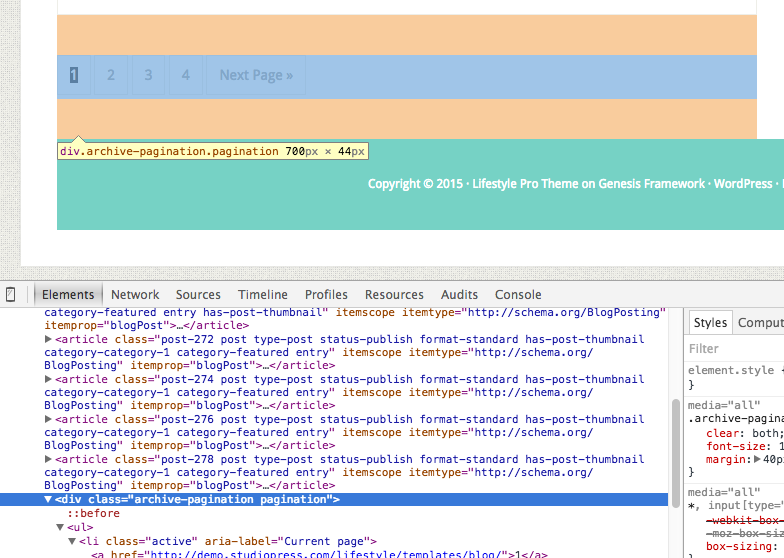
.archive-paginationis defined in WordPress as the area that displays the page info for an archive (blog posts, categories, etc.)
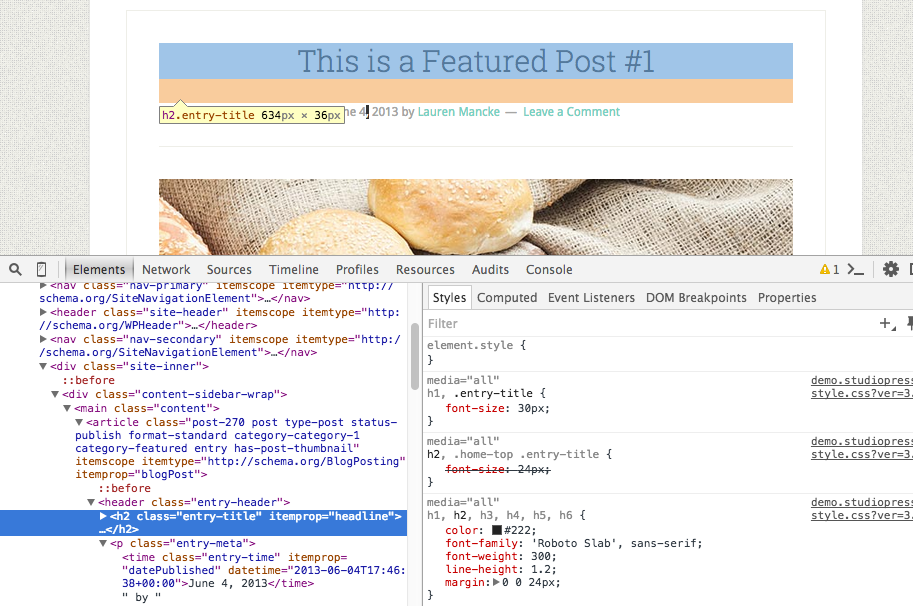
.entry-titleat it's simplest, in WordPress, is a post/page title, and appears in multiple places in a site.
Choose your next site design from over 350 Genesis themes.
[ Follow me: Twitter ] [ Follow Themes: Twitter ] [ My Favourite Webhost ]September 28, 2015 at 8:54 pm #166909MemberHi
Thanks. That is all useful. I didn't get the whole reply by email so copied from forum response. I have already begun reading and I realise now there has to be quite a bit of trial and error using element inspector. I added a google font but I think it may get overridden later on in the CSS. No doubt I hope I find this eventually. I am using LifestylePro Blue on one site and Purple on the other. I added the google font at the beginning of the CSS but maybe I should have put it in the LifestylePro Blue area.
Thanks anyway - you have moved forward and I'll see how far I can get.
-
AuthorPosts
- The forum ‘General Discussion’ is closed to new topics and replies.