• Skip to main content
  • Skip to forum navigation

StudioPress

  • Shop for Themes
  • My StudioPress

Forum navigation

  • Home
  • General Genesis Discussions
  • StudioPress Themes
  • Genesis Blocks
    • Genesis Blocks
    • Genesis Custom Blocks
  • Retired Themes
  • FAQs
  • Forum Rules
  • Internationalization and Translations
  • Forum Bugs and Suggestions
  • Forum Log In

Are You Using The WordPress Block Editor?

Genesis now offers plugins that help you build better sites faster with the WordPress block editor (Gutenberg). Try the feature-rich free versions of each plugin for yourself!

Genesis Blocks Genesis Custom Blocks

New site using EPIK theme

Welcome!

These forums are for general discussion on WordPress and Genesis. Official support for StudioPress themes is offered exclusively at My StudioPress. Responses in this forum are not guaranteed. Please note that this forum will require a new username, separate from the one used for My.StudioPress.

Log In
Register Lost Password

Community Forums › Forums › Archived Forums › Showcase and Feedback › New site using EPIK theme

  • This topic has 4 replies, 4 voices, and was last updated 12 years, 8 months ago by KiwiDean.
Viewing 5 posts - 1 through 5 (of 5 total)
  • Author
    Posts
  • May 15, 2013 at 12:52 pm #41056
    Susan
    Moderator

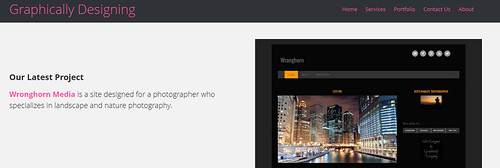
    I just created a new site using the Community Marketplace theme, EPIK. I used the pink color option.

    The home page has multiple widgeted areas, but I didn't need to use them all - maybe one day.

    http://www.graphicallydesigning.com

    Any feedback would be appreciated!

    http://www.graphicallydesigning.com
    May 15, 2013 at 6:07 pm #41090
    Brad Dalton
    Participant

    Portfolio page looks great.

    Home page first widget needs some more text or a call to action.

    How did you put the images in the computer screens.

    Nice job Susan.


    Tutorials for StudioPress Themes.

    May 15, 2013 at 6:18 pm #41093
    Susan
    Moderator

    Thanks, Brad.

    I think it needs a call to action, too - just haven't had the chance to do it yet.

    I put the images in the computer screen using picmonkey.com (free image editing site). I got the computer screen through a stock photography site (I use bigstock.com); the Epik theme uses the same images. I loaded them into the three widget areas on the home page. It was pretty easy once I figured out the right size to use! 🙂

    May 18, 2013 at 4:18 pm #41544
    ModernMuse
    Member

    Ooh, I like the direction you're headed. This is a very elegant, modern-looking site. 🙂

    I would agree that some more text should go on the left-hand side of the large screen shot. Something to balance it out a bit. I'm sure there's a good reason why you chose it, but I feel like there's too much contrast between the dark theme and the rest of your site's color scheme.

    Maybe a picture or some kind of illustration to spruce up your about page? The inner pages of the site need some images to break up the text (I'm guilty of this, too, on my sites Lol). On that note, repeating design elements do a great job of pulling together a site if you don't wanna slow it down with large images.

    It's looking very nice. xo


    @ModernMuseNV | Portfolio | Personal Blog

    May 18, 2013 at 9:34 pm #41574
    KiwiDean
    Member

    I would go in and change the header background to black and use pink text. At the moment the pink is over powering the site you are show casing (and everything else). I think it would tie the site together more like so:
    graphicallydesigning
    For my 5 cents.


    If you aren’t having fun you are doing it wrong

  • Author
    Posts
Viewing 5 posts - 1 through 5 (of 5 total)
  • The forum ‘Showcase and Feedback’ is closed to new topics and replies.

CTA

Ready to get started? Create a site or shop for themes.

Create a site with WP EngineShop for Themes

Footer

StudioPress

© 2026 WPEngine, Inc.

Products
  • Create a Site with WP Engine
  • Shop for Themes
  • Theme Features
  • Get Started
  • Showcase
Company
  • Brand Assets
  • Terms of Service
  • Accptable Usse Policy
  • Privacy Policy
  • Refund Policy
  • Contact Us
Community
  • Find Developers
  • Forums
  • Facebook Group
  • #GenesisWP
  • Showcase
Resources
  • StudioPress Blog
  • Help & Documentation
  • FAQs
  • Code Snippets
  • Affiliates
Connect
  • StudioPress Live
  • StudioPress FM
  • Facebook
  • Twitter
  • Dribbble