• Skip to main content
  • Skip to forum navigation

StudioPress

  • Shop for Themes
  • My StudioPress

Forum navigation

  • Home
  • General Genesis Discussions
  • StudioPress Themes
  • Genesis Blocks
    • Genesis Blocks
    • Genesis Custom Blocks
  • Retired Themes
  • FAQs
  • Forum Rules
  • Internationalization and Translations
  • Forum Bugs and Suggestions
  • Forum Log In

Are You Using The WordPress Block Editor?

Genesis now offers plugins that help you build better sites faster with the WordPress block editor (Gutenberg). Try the feature-rich free versions of each plugin for yourself!

Genesis Blocks Genesis Custom Blocks

How to reduce menubar and logo header area height of News Pro Theme?

Welcome!

These forums are for general discussion on WordPress and Genesis. Official support for StudioPress themes is offered exclusively at My StudioPress. Responses in this forum are not guaranteed. Please note that this forum will require a new username, separate from the one used for My.StudioPress.

Log In
Register Lost Password

Community Forums › Forums › Archived Forums › General Discussion › How to reduce menubar and logo header area height of News Pro Theme?

This topic is: resolved

Tagged: css, News Pro

  • This topic has 7 replies, 2 voices, and was last updated 8 years, 7 months ago by Pramod Kumar.
Viewing 8 posts - 1 through 8 (of 8 total)
  • Author
    Posts
  • November 2, 2017 at 4:48 am #213166
    Pramod Kumar
    Member

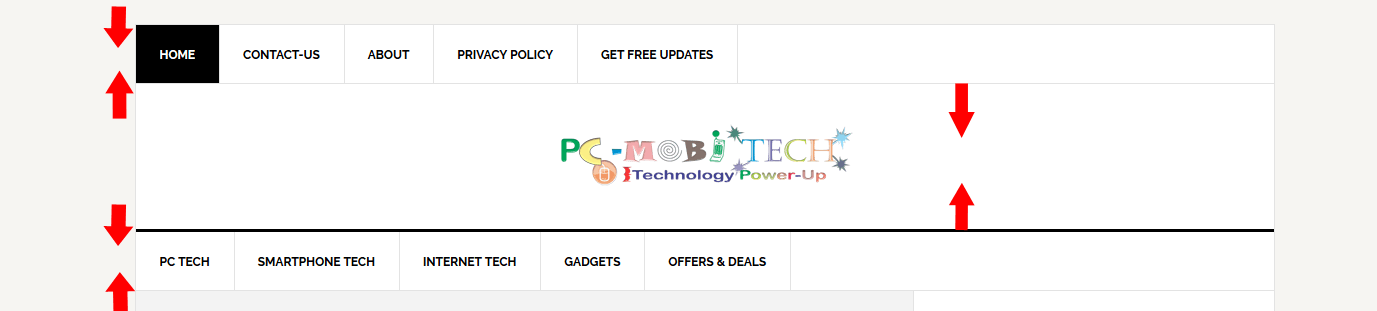
    I want to reduce menu bar and theme logo header height, Which CSS rules I'll need to edit in News Pro Style.css file?
    Reduce news Pro theme header and menu size

    Thanks!
    Pramod Kumar

    https://www.pcmobitech.com
    November 2, 2017 at 6:38 am #213169
    sangfroidweb
    Participant

    Hi there,
    You can reduce the height of those areas by adjusting the padding on the menu items and the .site-header .wrap.

    On line 1133 of the stylesheet:

    .genesis-nav-menu a {
    border-right: 1px solid #e3e3e3;
    color: #000;
    display: block;
    padding: 20px 24px;
    position: relative;
    }

    Reduce the padding from "padding: 20px 24px;" to something less, like "padding: 10px 24px;" (or whatever amount you prefer)

    On line 1025 of the stylesheet:

    .site-header .wrap {
    padding: 40px 0;
    }

    Reduce the padding from "padding: 40px 0;" to something less, like "padding: 20px 0;" (or whatever amount you prefer)

    Hope that helps!
    Liz


    Liz or Eddy @SangFroid Web — Customizing StudioPress themes at http://www.wpstudioworks.com and building custom Genesis Child themes for businesses at http://www.sangfroidwebdesign.com 🙂

    November 2, 2017 at 8:12 am #213175
    Pramod Kumar
    Member

    Thanks a lot, it is working perfectly. 🙂

    November 2, 2017 at 8:31 am #213176
    sangfroidweb
    Participant

    Great! When you have time, be sure to mark the topic as 'Resolved' if no further issues.
    Thx!
    Liz


    Liz or Eddy @SangFroid Web — Customizing StudioPress themes at http://www.wpstudioworks.com and building custom Genesis Child themes for businesses at http://www.sangfroidwebdesign.com 🙂

    November 2, 2017 at 8:36 am #213179
    Pramod Kumar
    Member

    Yes, of course, I'm marking it as resolved.
    Thanks!

    November 2, 2017 at 8:52 am #213180
    Pramod Kumar
    Member

    Sorry For disturbing again, The logo seems fine on desktop but on mobile still having space. How to fix this?

    November 2, 2017 at 9:07 am #213181
    sangfroidweb
    Participant

    Hi again!

    To adjust it on mobile...On line 1958 reduce the padding of .site-header .wrap:

    .site-header .wrap {
    padding: 20px 0;
    }

    Change "padding: 20px 0;" to "padding: 5px 0;" (or whatever you prefer)

    ...and on line 1954, reduce the bottom margin of .site-header .title-area:

    .site-header .title-area {
    padding-bottom: 16px;
    }

    Change "padding-bottom: 16px;" to "padding-bottom: 0px;" (or whatever amount you prefer.

    Hope that helps!
    Thx!
    Liz


    Liz or Eddy @SangFroid Web — Customizing StudioPress themes at http://www.wpstudioworks.com and building custom Genesis Child themes for businesses at http://www.sangfroidwebdesign.com 🙂

    November 2, 2017 at 9:18 am #213183
    Pramod Kumar
    Member

    Thank you very much, you helped me a lot. 🙂

  • Author
    Posts
Viewing 8 posts - 1 through 8 (of 8 total)
  • The topic ‘How to reduce menubar and logo header area height of News Pro Theme?’ is closed to new replies.

CTA

Ready to get started? Create a site or shop for themes.

Create a site with WP EngineShop for Themes

Footer

StudioPress

© 2026 WPEngine, Inc.

Products
  • Create a Site with WP Engine
  • Shop for Themes
  • Theme Features
  • Get Started
  • Showcase
Company
  • Brand Assets
  • Terms of Service
  • Accptable Usse Policy
  • Privacy Policy
  • Refund Policy
  • Contact Us
Community
  • Find Developers
  • Forums
  • Facebook Group
  • #GenesisWP
  • Showcase
Resources
  • StudioPress Blog
  • Help & Documentation
  • FAQs
  • Code Snippets
  • Affiliates
Connect
  • StudioPress Live
  • StudioPress FM
  • Facebook
  • Twitter
  • Dribbble