• Skip to main content
  • Skip to forum navigation

StudioPress

  • Shop for Themes
  • My StudioPress

Forum navigation

  • Home
  • General Genesis Discussions
  • StudioPress Themes
  • Genesis Blocks
    • Genesis Blocks
    • Genesis Custom Blocks
  • Retired Themes
  • FAQs
  • Forum Rules
  • Internationalization and Translations
  • Forum Bugs and Suggestions
  • Forum Log In

Are You Using The WordPress Block Editor?

Genesis now offers plugins that help you build better sites faster with the WordPress block editor (Gutenberg). Try the feature-rich free versions of each plugin for yourself!

Genesis Blocks Genesis Custom Blocks

Help customizing Minimum Pro

Welcome!

These forums are for general discussion on WordPress and Genesis. Official support for StudioPress themes is offered exclusively at My StudioPress. Responses in this forum are not guaranteed. Please note that this forum will require a new username, separate from the one used for My.StudioPress.

Log In
Register Lost Password

Community Forums › Forums › Archived Forums › General Discussion › Help customizing Minimum Pro

This topic is: not resolved

Tagged: customize, MinimumPro

  • This topic has 4 replies, 2 voices, and was last updated 10 years, 8 months ago by Brad Dalton.
Viewing 5 posts - 1 through 5 (of 5 total)
  • Author
    Posts
  • May 4, 2015 at 7:41 pm #150147
    rdr
    Participant

    Hi, folks. Could you possibility give me some help customizing Minimum Pro? I'm trying to inject some test into my landing page but, for the life of me, can't figure how to make it happen.

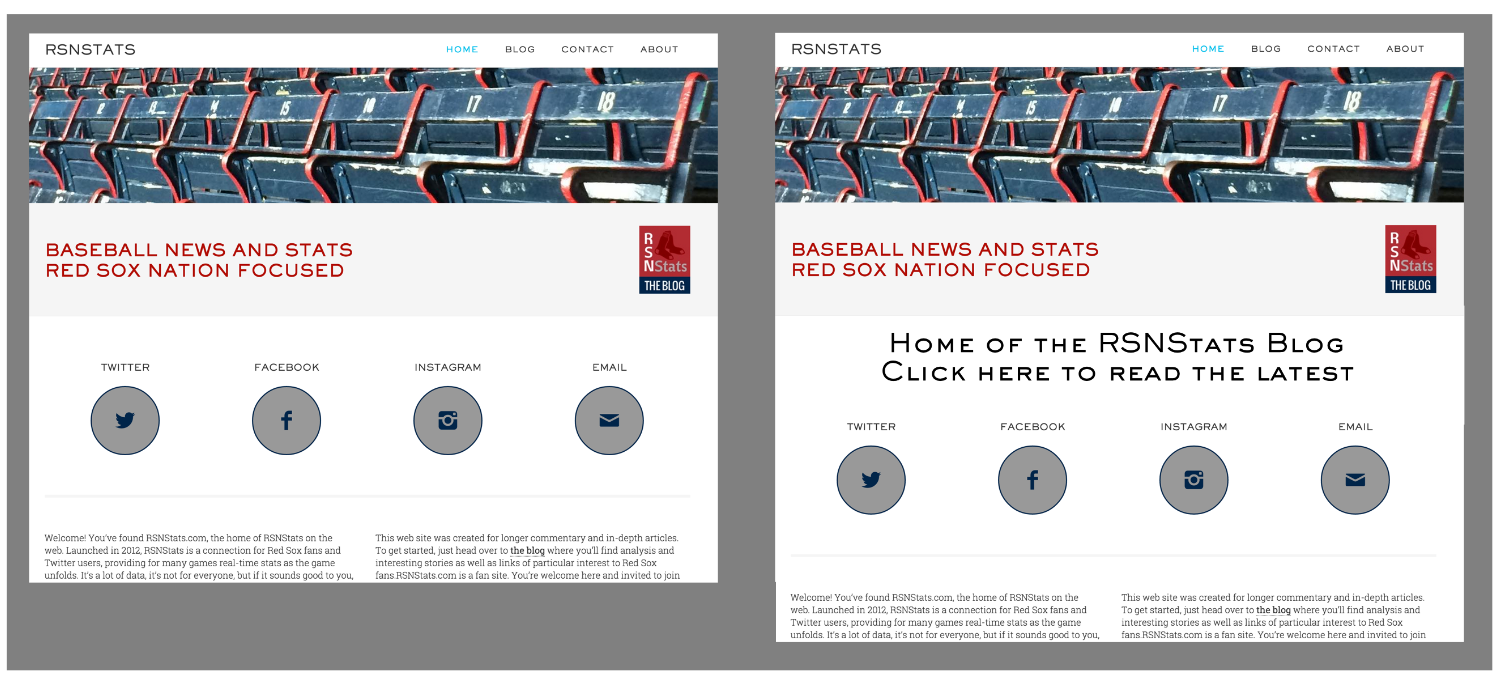
    Here's an image that I hope will make clear what I want to do:

    http://rsnstats.com/wp-content/uploads/2015/05/slice1.png

    In the image, the view on the left is how it looks today and the view on the right shows the kind of thing I'm hoping to do by injecting some text just above the Twitter/Facebook/Instagram/Email buttons.

    Thanks so much for any guidance.

    http://www.rsnstats.com
    May 4, 2015 at 10:02 pm #150155
    Brad Dalton
    Participant

    You can create a new widget area using the genesis_after_header hook

    Here's another post which pretty much shows you the same thing but from a different angle

    If you're gluing to develop your site yourself, i suggest you create a demo site and test code on a copy of your theme before adding it to your live site.

    What i have done is installed WordPress locally for testing code.


    Tutorials for StudioPress Themes.

    May 5, 2015 at 10:35 am #150239
    rdr
    Participant

    Brad -- Thank you very much for the response.

    Thanks for the links. I didn't realize that I could add additional widget areas. This really helps me better understand the value of the framework.

    Again, much appreciated.

    -- Robert

    May 5, 2015 at 1:39 pm #150273
    rdr
    Participant

    Again, Brad, thank you for your help. With your guidance I figured out how to add a new widget area and populate it (as well as conditionally display it adter the header but only on the front page of my site.

    The results are at http://www.rsnstats.com.

    I'm very grateful for your help. Thanks again.

    -- Robert

    May 5, 2015 at 1:46 pm #150275
    Brad Dalton
    Participant

    No worries Robert.


    Tutorials for StudioPress Themes.

  • Author
    Posts
Viewing 5 posts - 1 through 5 (of 5 total)
  • The forum ‘General Discussion’ is closed to new topics and replies.

CTA

Ready to get started? Create a site or shop for themes.

Create a site with WP EngineShop for Themes

Footer

StudioPress

© 2026 WPEngine, Inc.

Products
  • Create a Site with WP Engine
  • Shop for Themes
  • Theme Features
  • Get Started
  • Showcase
Company
  • Brand Assets
  • Terms of Service
  • Accptable Usse Policy
  • Privacy Policy
  • Refund Policy
  • Contact Us
Community
  • Find Developers
  • Forums
  • Facebook Group
  • #GenesisWP
  • Showcase
Resources
  • StudioPress Blog
  • Help & Documentation
  • FAQs
  • Code Snippets
  • Affiliates
Connect
  • StudioPress Live
  • StudioPress FM
  • Facebook
  • Twitter
  • Dribbble