• Skip to main content
  • Skip to forum navigation

StudioPress

  • Shop for Themes
  • My StudioPress

Forum navigation

  • Home
  • General Genesis Discussions
  • StudioPress Themes
  • Genesis Blocks
    • Genesis Blocks
    • Genesis Custom Blocks
  • Retired Themes
  • FAQs
  • Forum Rules
  • Internationalization and Translations
  • Forum Bugs and Suggestions
  • Forum Log In

Are You Using The WordPress Block Editor?

Genesis now offers plugins that help you build better sites faster with the WordPress block editor (Gutenberg). Try the feature-rich free versions of each plugin for yourself!

Genesis Blocks Genesis Custom Blocks

Bluehost wants to upgrade to PHP 5.4

Welcome!

These forums are for general discussion on WordPress and Genesis. Official support for StudioPress themes is offered exclusively at My StudioPress. Responses in this forum are not guaranteed. Please note that this forum will require a new username, separate from the one used for My.StudioPress.

Log In
Register Lost Password

Community Forums › Forums › Archived Forums › General Discussion › Bluehost wants to upgrade to PHP 5.4

This topic is: not resolved

Tagged: Curtail Theme, php

  • This topic has 7 replies, 6 voices, and was last updated 12 years, 1 month ago by Summer.
Viewing 8 posts - 1 through 8 (of 8 total)
  • Author
    Posts
  • November 5, 2013 at 2:47 am #71019
    Genghis7777
    Member

    Hi

    This is a call for help.

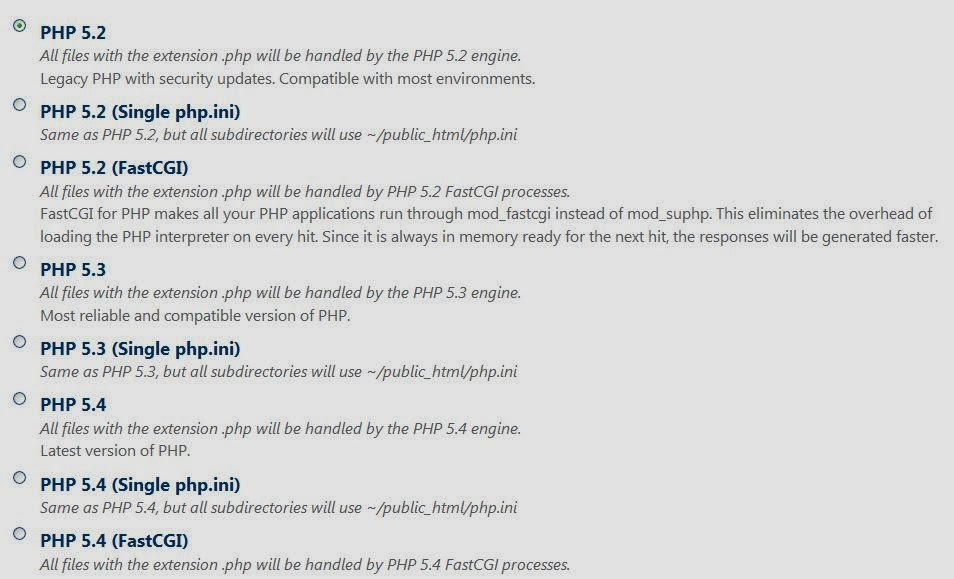
    Bluehost just sent me an email saying that my site based on Curtail 1.0 (www.nzfoi.org) is using PHP 5.2. They want to phase this out and want me to upgrade to 5.4. However when I get to Bluehost they have all these choices and variations of PHP and I'm at a loss as to which one to choose:

    BlueHost PHP choices

    Any clues?

    http://www.nzfoi.org
    November 5, 2013 at 9:20 am #71049
    anyname
    Member

    IMO just go to the standard 5.4 version. I'm assuming they're using just the standard LAMP stack i.e Apache, MySQL , PHP and not some fancy nginx incarnation. MySQL will probably be 5.5+ which is fine and Apache either 2.2 or 2.4, probably the former for now.

    PHP 5.4 is fine with WP and is much improved over 5.2 and 5.3 both of which are end-of-life streams. We're on 5.5 atm with 5.4 the legacy stream. Hosts are always a stream behind at least.

    November 5, 2013 at 12:53 pm #71082
    Genghis7777
    Member

    Upgraded to 5.4 and don't see anything wrong. Thx everyone.

    December 8, 2013 at 6:54 pm #77757
    maxtimbus
    Member

    I also received this message. When I selected PHP 5.4 my site is now a blank white page, what should I do?

    Thank you...

    December 9, 2013 at 4:51 pm #77906
    Genghis7777
    Member

    I'm sorry, but can't help as I never encountered this problem. Maybe the good people at Studiopress could chime in. 🙂

    December 13, 2013 at 11:35 am #78837
    rickb
    Member

    I am habving the same problem - white screen after I update to php5.4

    had been runnoing on 5.2

    December 19, 2013 at 8:35 am #80193
    Jeannie Barker
    Member

    Any solution for the white screen after host upgraded to PHP 5.4?

    December 19, 2013 at 8:57 am #80196
    Summer
    Member

    If you're using cPanel, go to your website home directory and see if there's a file "error_log" there. Edit that, and you should see PHP related errors in there that might help narrow down what's causing the WSOD.

    You might also try editing wp-config.php and changing WP_DEBUG to "true", and see if that prints any errors out on the white screen of death.


    WordPress / Genesis Site Design & Troubleshooting: A Touch of Summer | @SummerWebDesign
    Slice of SciFi | Writers, After Dark

  • Author
    Posts
Viewing 8 posts - 1 through 8 (of 8 total)
  • The forum ‘General Discussion’ is closed to new topics and replies.

CTA

Ready to get started? Create a site or shop for themes.

Create a site with WP EngineShop for Themes

Footer

StudioPress

© 2026 WPEngine, Inc.

Products
  • Create a Site with WP Engine
  • Shop for Themes
  • Theme Features
  • Get Started
  • Showcase
Company
  • Brand Assets
  • Terms of Service
  • Accptable Usse Policy
  • Privacy Policy
  • Refund Policy
  • Contact Us
Community
  • Find Developers
  • Forums
  • Facebook Group
  • #GenesisWP
  • Showcase
Resources
  • StudioPress Blog
  • Help & Documentation
  • FAQs
  • Code Snippets
  • Affiliates
Connect
  • StudioPress Live
  • StudioPress FM
  • Facebook
  • Twitter
  • Dribbble