• Skip to main content
  • Skip to forum navigation

StudioPress

  • Shop for Themes
  • My StudioPress

Forum navigation

  • Home
  • General Genesis Discussions
  • StudioPress Themes
  • Genesis Blocks
    • Genesis Blocks
    • Genesis Custom Blocks
  • Retired Themes
  • FAQs
  • Forum Rules
  • Internationalization and Translations
  • Forum Bugs and Suggestions
  • Forum Log In

Are You Using The WordPress Block Editor?

Genesis now offers plugins that help you build better sites faster with the WordPress block editor (Gutenberg). Try the feature-rich free versions of each plugin for yourself!

Genesis Blocks Genesis Custom Blocks

Add JumpLink ( anchor text link ) on a tabbed page ?

Welcome!

These forums are for general discussion on WordPress and Genesis. Official support for StudioPress themes is offered exclusively at My StudioPress. Responses in this forum are not guaranteed. Please note that this forum will require a new username, separate from the one used for My.StudioPress.

Log In
Register Lost Password

Community Forums › Forums › Archived Forums › General Discussion › Add JumpLink ( anchor text link ) on a tabbed page ?

This topic is: not resolved

Tagged: anchor text, jump links, links on tabbed pages

  • This topic has 2 replies, 2 voices, and was last updated 11 years, 7 months ago by fotodog13.
Viewing 3 posts - 1 through 3 (of 3 total)
  • Author
    Posts
  • December 20, 2014 at 11:58 am #134961
    fotodog13
    Participant

    Hi All
    I am using the latest version of wordpress and the Executive Pro theme.
    I have created a tabbed page and would like to have links in the tabbed content section to advance the reader through a
    series of screens within the tabbed content.

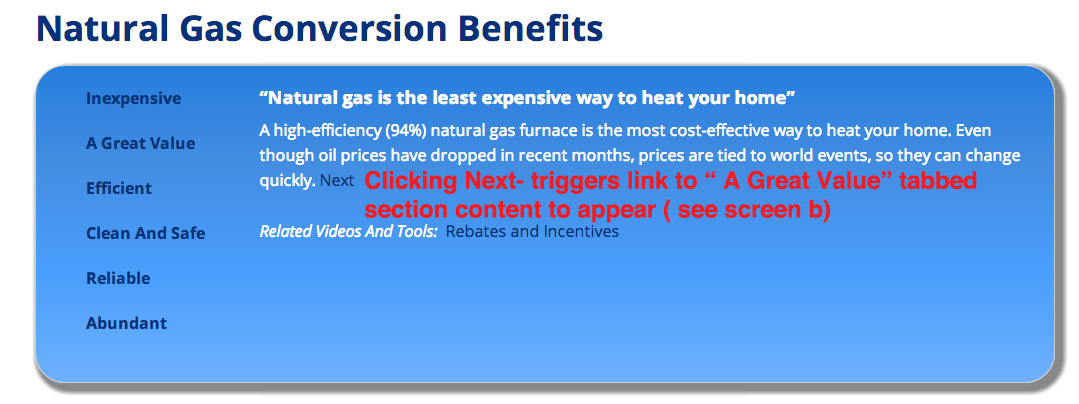
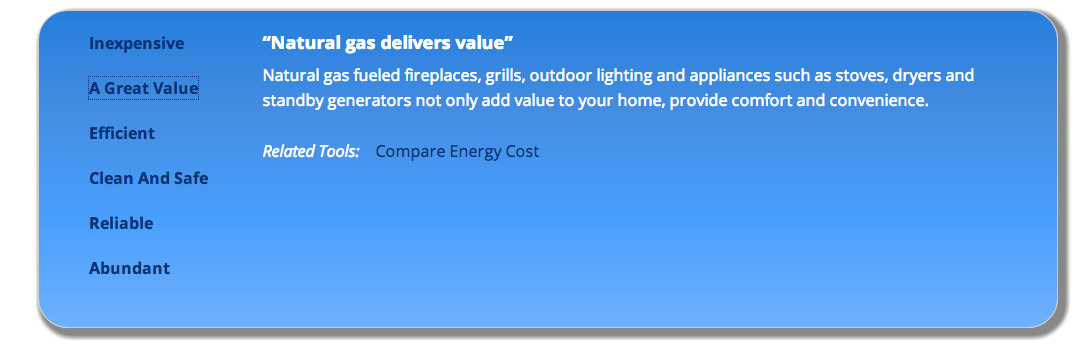
    I have to have the site in closed mode right now but I have posted some screen shots that illustrate what I am trying to
    accomplish at the following location

    ScreenA = http://fotofiction.com/ngSample/ng-screen-a.jpg
    ScreenB= http://fotofiction.com/ngSample/ng-screen-b.jpg

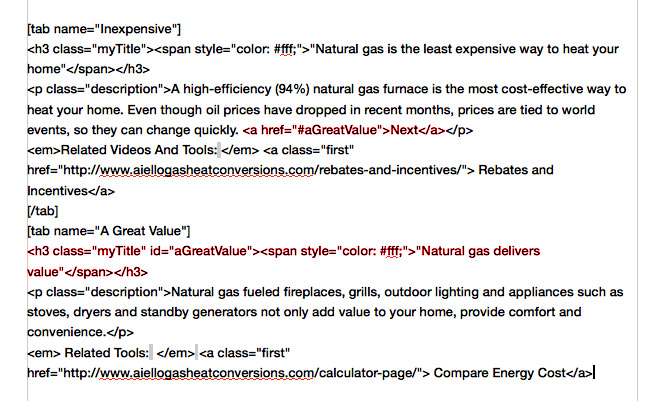
    Snapshot of my code that I have tried to get to work
    http://fotofiction.com/ngSample/ng-sample-code.jpg

    As always I appreciate anyone that can tell me how to solve the problem, sorry about the convoluted way I had to present it by not being able to include the site URL

    thanks

    December 21, 2014 at 11:55 pm #135046
    Brad Dalton
    Participant

    This might help http://wpsites.net/web-design/how-to-create-anchor-points/


    Tutorials for StudioPress Themes.

    December 22, 2014 at 7:31 am #135056
    fotodog13
    Participant

    Thanks Brad- Unfortunately that doesn't work.
    I think because this is a tabbed page it does not recognize the anchor.
    I tried several variations placing the anchor above the H3, in hte H3, and after the H3 but none work.
    I think it probably is because the page is tabbed -

  • Author
    Posts
Viewing 3 posts - 1 through 3 (of 3 total)
  • The forum ‘General Discussion’ is closed to new topics and replies.

CTA

Ready to get started? Create a site or shop for themes.

Create a site with WP EngineShop for Themes

Footer

StudioPress

© 2026 WPEngine, Inc.

Products
  • Create a Site with WP Engine
  • Shop for Themes
  • Theme Features
  • Get Started
  • Showcase
Company
  • Brand Assets
  • Terms of Service
  • Accptable Usse Policy
  • Privacy Policy
  • Refund Policy
  • Contact Us
Community
  • Find Developers
  • Forums
  • Facebook Group
  • #GenesisWP
  • Showcase
Resources
  • StudioPress Blog
  • Help & Documentation
  • FAQs
  • Code Snippets
  • Affiliates
Connect
  • StudioPress Live
  • StudioPress FM
  • Facebook
  • Twitter
  • Dribbble