Forum Replies Created
-
AuthorPosts
-
neilgee
MemberLooks like the page header padding- find these selectors in the CSS and change the padding amount - 2% looks ok
@media only screen and (min-width: 800px)
.page-header {
    padding: 2% 0;
}
.page-header { padding: 2% 0; position: relative; text-align: center; color: #fff; }
Neil Gee
WP Beaches
Coolest GuidesJuly 12, 2016 at 10:36 pm in reply to: The best lightweight image-gallery plugin for Genesis? #189372MemberI've just finished doing one - demo here - http://themes.wpbeaches.com/venobox/ it's in the WP repo here https://wordpress.org/plugins/venobox-lightbox/
Neil Gee
WP Beaches
Coolest GuidesMemberActually better just to target the menu instead with transparency - less issues in the future
.genesis-nav-menu {
    clear: both;
    font-size: 16px;
    line-height: 1;
    width: 100%;
    text-align: right;
    font-family: 'impact_labelregular';
    color: transparent;
}
Neil Gee
WP Beaches
Coolest GuidesMemberLooks like it's taking on the color from the bodytag - if you change that to transparent it fixes the issue
body {
    background: #9596aa url(http://www.alisonfreed.com/wp-content/uploads/bg-1.jpg) repeat 0 0 !important;
    color: transparent;
    font-family: 'Overlock', cursive;
    font-size: 18px;
    font-weight: 300;
    line-height: 1.625;
}
Not ideal, you'll have to make sure all elements don't rely on getting the color cascaded from the body - but it solves it (looks like the font is causing the problem).
Neil Gee
WP Beaches
Coolest GuidesMemberFind these 3 CSS Selectors in your style.css and change the width values.....
.site-header .widget-area {
    float: right;
    text-align: right;
    width: 60%;
}

.title-area {
    float: left;
    padding: 0;
    width: 40%;
}

@media only screen and (max-width: 1159px) {
  .site-header .widget-area {
      width: 60%;
  }

}
Neil Gee
WP Beaches
Coolest GuidesFebruary 19, 2016 at 5:13 pm in reply to: How to change the background-color only in footer widget text in Altitude pro? #179429MemberYou have to be more specific in the CSS to change certain parts - say for instance you just want to change the footer widgets you would need to edit this rule on line 1628 ...
.footer-widgets {
    background-color: #22a1c4;
    clear: both;
    text-align: center;
    position: relative;
    z-index: 9;
}
That will change the bg color only in that area.
Neil Gee
WP Beaches
Coolest GuidesFebruary 19, 2016 at 4:38 pm in reply to: Minimum Pro Theme: Removed the site-tagline, no space left #179426MemberFebruary 19, 2016 at 1:59 am in reply to: Minimum Pro Theme: Removed the site-tagline, no space left #179370Membertry changing the padding-top value of .site-inner on line 416
.site-inner {
    background-color: #fff;
    clear: both;
    padding-top: 80px;
}
Neil Gee
WP Beaches
Coolest GuidesFebruary 19, 2016 at 1:56 am in reply to: Blog Text overflowing and creating new column in sidebar #179368MemberLooks like the sections have been moved in the markup - there is a lot of specialness going on here...
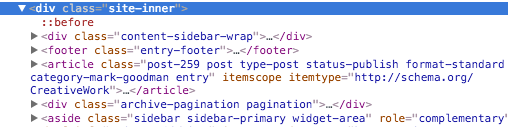
The sidebar has been moved out of the content wrap - there is an article outside of the loop and the sidebar is also set to display inline.
I think you'd best start to remove the custom hook/action moves and go from there - I have no idea how this was done but check in your functions.php and comment out code that moves the sidebar - you may need to paste your functions.php here to get further help.
Neil Gee
WP Beaches
Coolest GuidesJanuary 29, 2016 at 7:11 pm in reply to: Utility Bar Text being Indexed in Meta Description by Google #177878MemberThe meta description will change depending on the search query - you can try and sway what Google displays with the meta description tag but you can't ultimately control it.
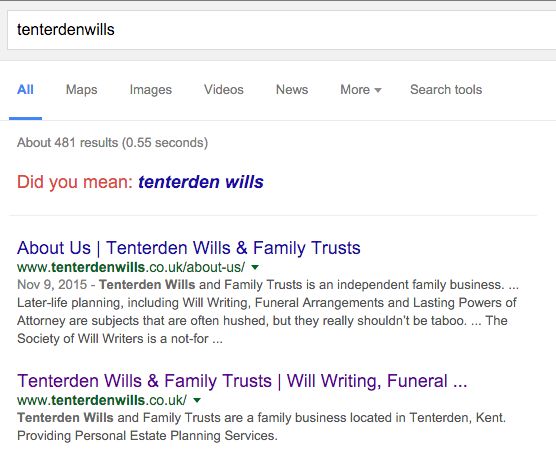
For example the 2nd result above does use it.
Neil Gee
WP Beaches
Coolest GuidesMemberDid you resolve?
I have found that the issue happens with the blog archive when it appears on a template such as front-page.php - the shares don't show up and a javascript error is shown which you can see in the web console of your browsers developer tools
Uncaught TypeError: $(...).waypoint is not a functionThe resolution I have found is to enqueue the missing script - you can see some reference here
https://github.com/copyblogger/genesis-simple-share/issues/65
Neil Gee
WP Beaches
Coolest GuidesMemberYes Victor is correct with the adding to or replacing.
The code is valid - if it is still not working check for another filter that may be overriding it.
Neil Gee
WP Beaches
Coolest GuidesMemberIt's not the sample theme causing the issue - it's some CSS that has set some elements on the page to a specific width - you can get around this with some additional CSS - targeting the smaller sizes - add this at the end of your main style.css
@media only screen and (max-width: 850px) {

	.entry {
		width: 100%;
	}
	.site-inner {
		background-color: #95070a;
	}
}
Neil Gee
WP Beaches
Coolest GuidesMemberTry adding
wp_enqueue_script( 'genesis-simple-share-waypoint-js' );to your functions.php file
Neil Gee
WP Beaches
Coolest GuidesMemberI would go with the themes implementation as the breadcrumb markup is taken care of for you, you just enable and it appears.
For Yoast SEO implementation the
yoast_breadcrumbfunction will need to be added to your theme - http://kb.yoast.com/article/245-implement-wordpress-seo-breadcrumbs
Neil Gee
WP Beaches
Coolest GuidesMemberSo I just see the one menu on the page which is the #menu-top-menu is this the one you mean, it currently is horizontal similar to the original theme.
Neil Gee
WP Beaches
Coolest GuidesMemberI have answered your comment here - https://wpbeaches.com/add-footer-menu-genesis-child-theme/ - you just need to add the code in the themes functions.php file
Neil Gee
WP Beaches
Coolest GuidesMemberPHP is not going away anytime soon, what is on the rise and predicted to be used more so in the future is more JavaScript, in particular for backend APIs.
So there has been a call to developers to get to grips more with the language.
Neil Gee
WP Beaches
Coolest GuidesMemberYes that has annoyed me previously, you need to remove a CSS property in the body tag on line 148 of style.css
Remove
-webkit-font-smoothing: antialiased;
Neil Gee
WP Beaches
Coolest GuidesMemberCalypso will also work on your self hosted WordPress sites as well as long as you have JetPack and the Manage module activated.
It basically is an alternative to using the WP Admin dashboard instead the new javascript Rest API, so you can edit posts and pages, switch themes, activate plugins etc
StudioPress themes and other theme developers will still continue to develop themes in the normal way. As long as there is a design presentation layer needed be it via a browser or an app we still need that originality to get that brand and look across.
Neil Gee
WP Beaches
Coolest Guides -
AuthorPosts