• Skip to main content
  • Skip to forum navigation

StudioPress

  • Shop for Themes
  • My StudioPress

Forum navigation

  • Home
  • General Genesis Discussions
  • StudioPress Themes
  • Genesis Blocks
    • Genesis Blocks
    • Genesis Custom Blocks
  • Retired Themes
  • FAQs
  • Forum Rules
  • Internationalization and Translations
  • Forum Bugs and Suggestions
  • Forum Log In

Are You Using The WordPress Block Editor?

Genesis now offers plugins that help you build better sites faster with the WordPress block editor (Gutenberg). Try the feature-rich free versions of each plugin for yourself!

Genesis Blocks Genesis Custom Blocks

Sidebar content interfering with Metro custom header

Welcome!

These forums are for general discussion on WordPress and Genesis. Official support for StudioPress themes is offered exclusively at My StudioPress. Responses in this forum are not guaranteed. Please note that this forum will require a new username, separate from the one used for My.StudioPress.

Log In
Register Lost Password

Community Forums › Forums › Archived Forums › Design Tips and Tricks › Sidebar content interfering with Metro custom header

This topic is: not resolved

Tagged: Metro theme.

  • This topic has 2 replies, 3 voices, and was last updated 13 years, 4 months ago by Brad Dalton.
Viewing 3 posts - 1 through 3 (of 3 total)
  • Author
    Posts
  • March 12, 2013 at 10:19 pm #25779
    wittycassiehere
    Member

    Hi all,

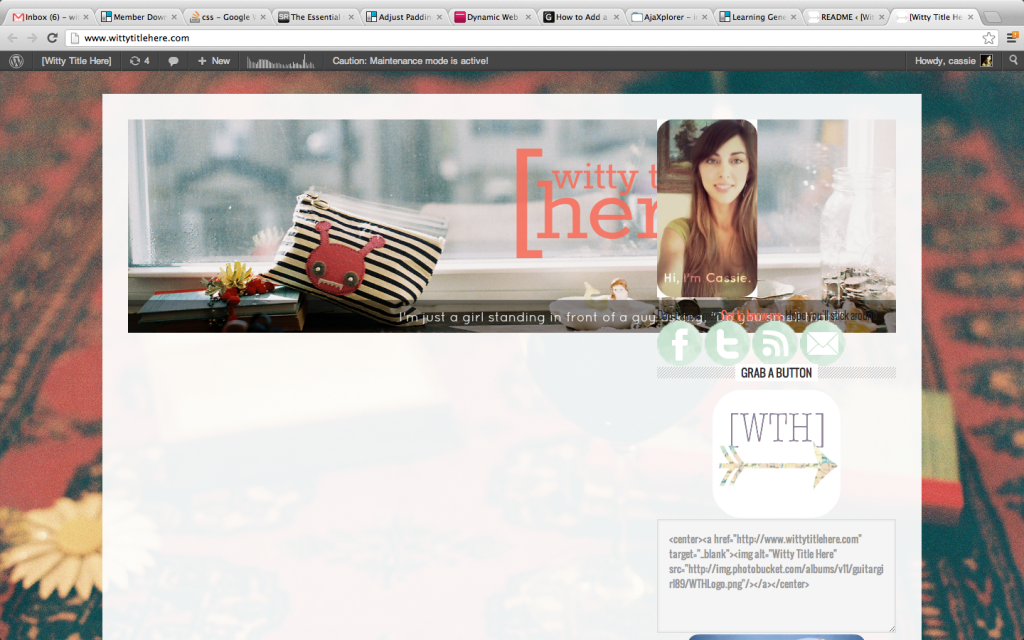
    I am working in maintenance mode at the moment, as I don't want my site to go live with the new Metro theme until I've got all the kinks worked out. I created a custom 1080x300 header image for a full-width look, but now am having problems with the sidebar content getting smashed up into my header. Known causes/fixes for this?

    Since it's not live on my site, here's a screenshot:

    http://img.photobucket.com/albums/v11/guitargirl89/ScreenShot2013-03-13at120938AM_zpseb602f63.png

    As always, your help is appreciated!


    Cassie
    [Witty Title Here]

    March 13, 2013 at 4:37 pm #26065
    AnitaC
    Keymaster

    It's difficult to assist when we can't view your code and css. Is there a way to turn it on temporarily? You can add the link to your site in privately so as to not make it public in here.


    Need help with customization or troubleshooting? Reach out to me.

    March 13, 2013 at 8:23 pm #26100
    Brad Dalton
    Participant

    You need to modify the CSS for your header in your child themes style.css file.

    Another way to do this is to install the Genesis Simple Hooks plugin and paste in the HTML for your header image into the genesis_header hook field and unhook the header.

    You can use the advanced image settings for your image to adjust the vertical and horizontal spacing inline.

    Simply insert your header image into a new post draft and grab the HTML code from the text editor.


    Tutorials for StudioPress Themes.

  • Author
    Posts
Viewing 3 posts - 1 through 3 (of 3 total)
  • The forum ‘Design Tips and Tricks’ is closed to new topics and replies.

CTA

Ready to get started? Create a site or shop for themes.

Create a site with WP EngineShop for Themes

Footer

StudioPress

© 2026 WPEngine, Inc.

Products
  • Create a Site with WP Engine
  • Shop for Themes
  • Theme Features
  • Get Started
  • Showcase
Company
  • Brand Assets
  • Terms of Service
  • Accptable Usse Policy
  • Privacy Policy
  • Refund Policy
  • Contact Us
Community
  • Find Developers
  • Forums
  • Facebook Group
  • #GenesisWP
  • Showcase
Resources
  • StudioPress Blog
  • Help & Documentation
  • FAQs
  • Code Snippets
  • Affiliates
Connect
  • StudioPress Live
  • StudioPress FM
  • Facebook
  • Twitter
  • Dribbble