• Skip to main content
  • Skip to forum navigation

StudioPress

  • Shop for Themes
  • My StudioPress

Forum navigation

  • Home
  • General Genesis Discussions
  • StudioPress Themes
  • Genesis Blocks
    • Genesis Blocks
    • Genesis Custom Blocks
  • Retired Themes
  • FAQs
  • Forum Rules
  • Internationalization and Translations
  • Forum Bugs and Suggestions
  • Forum Log In

Are You Using The WordPress Block Editor?

Genesis now offers plugins that help you build better sites faster with the WordPress block editor (Gutenberg). Try the feature-rich free versions of each plugin for yourself!

Genesis Blocks Genesis Custom Blocks

Magazine Pro – Can I move post_date out of the image?

Welcome!

These forums are for general discussion on WordPress and Genesis. Official support for StudioPress themes is offered exclusively at My StudioPress. Responses in this forum are not guaranteed. Please note that this forum will require a new username, separate from the one used for My.StudioPress.

Log In
Register Lost Password

Community Forums › Forums › Archived Forums › General Discussion › Magazine Pro – Can I move post_date out of the image?

This topic is: resolved

Tagged: entry date, Magazine Pro

  • This topic has 4 replies, 2 voices, and was last updated 4 years, 10 months ago by EatDrinkDeals.
Viewing 5 posts - 1 through 5 (of 5 total)
  • Author
    Posts
  • February 20, 2019 at 4:31 pm #489647
    EatDrinkDeals
    Participant

    I am a new Genesis user working to move my site from Woothemes Canvas to Genesis Mazazine Pro. I'd like to keep the current look and feel as much as possible. My website is http://www.eatdrinkdeals.com which is still on Canvas.
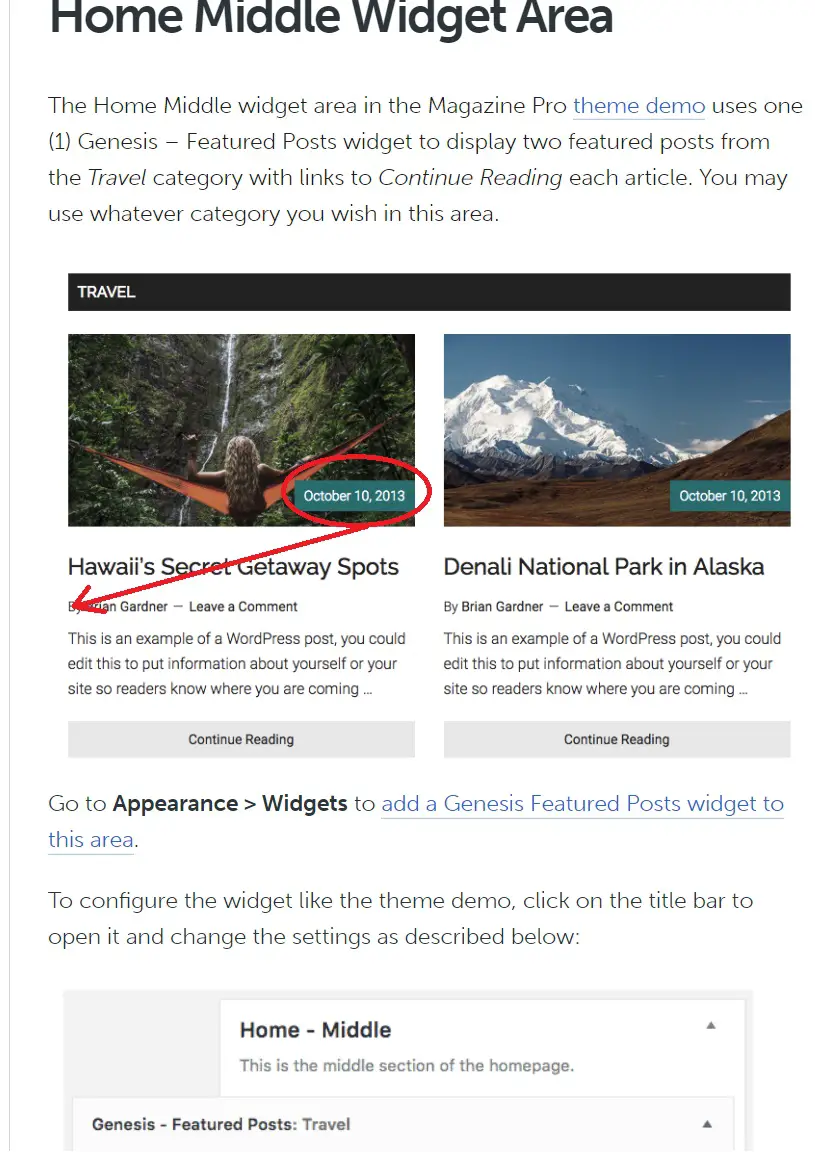
    I am getting close but one nagging issue is that on my Magazine Pro themed home page, I need to move the post_date out of the image and down to where the author byline is. My thumbnails are small, so the post_date overwhelms the image.
    I am using the Home Middle Widget area formatting. The following screen capture shows what I need to do. Any suggestions would be appreciated.
    https://www.eatdrinkdeals.com/home/wp-content/uploads/2019/02/genesis-problem3.jpg

    https://www.eatdrinkdeals.com/home/wp-content/uploads/2019/02/genesis-problem3.jpg
    February 22, 2019 at 11:21 am #489670
    Brad Dalton
    Participant

    Remove this code from lines 66 - 71 in functions.php

    wp_enqueue_script(
    		'magazine-entry-date',
    		get_stylesheet_directory_uri() . '/js/entry-date.js',
    		array( 'jquery' ),
    		'1.0.0'
    	);
    

    Tutorials for StudioPress Themes.

    February 23, 2019 at 10:55 am #489688
    EatDrinkDeals
    Participant

    Removing those lines worked great, thanks!

    December 26, 2020 at 3:48 pm #502408
    EatDrinkDeals
    Participant

    With the new Magazine Pro the lines regarding magazine-entry-date no longer appear in functions.php so the fix above no longer works. Can you give a new fix to remove post_date out of the image and down to above the excerpt?

    The following screencap shows what I need to do. Any suggestions would be appreciated.
    http://s000.tinyupload.com/?file_id=08144286423443491050

    December 27, 2020 at 9:34 am #502415
    EatDrinkDeals
    Participant

    Never mind, I got this entry date moved out of the image by commenting out these lines in functions.php:

    // if ( function_exists( 'genesis_blocks_text_domain' ) ) {
    // wp_enqueue_script(
    // genesis_get_theme_handle() . '-move-entry-dates',
    // get_stylesheet_directory_uri() . '/js/move-entry-dates.js',
    // [],
    // '1.1.0',
    // true
    // );
    // }

  • Author
    Posts
Viewing 5 posts - 1 through 5 (of 5 total)
  • The forum ‘General Discussion’ is closed to new topics and replies.

CTA

Ready to get started? Create a site or shop for themes.

Create a site with WP EngineShop for Themes

Footer

StudioPress

© 2025 WPEngine, Inc.

Products
  • Create a Site with WP Engine
  • Shop for Themes
  • Theme Features
  • Get Started
  • Showcase
Company
  • Brand Assets
  • Terms of Service
  • Accptable Usse Policy
  • Privacy Policy
  • Refund Policy
  • Contact Us
Community
  • Find Developers
  • Forums
  • Facebook Group
  • #GenesisWP
  • Showcase
Resources
  • StudioPress Blog
  • Help & Documentation
  • FAQs
  • Code Snippets
  • Affiliates
Connect
  • StudioPress Live
  • StudioPress FM
  • Facebook
  • Twitter
  • Dribbble