• Skip to main content
  • Skip to forum navigation

StudioPress

  • Shop for Themes
  • My StudioPress

Forum navigation

  • Home
  • General Genesis Discussions
  • StudioPress Themes
  • Genesis Blocks
    • Genesis Blocks
    • Genesis Custom Blocks
  • Retired Themes
  • FAQs
  • Forum Rules
  • Internationalization and Translations
  • Forum Bugs and Suggestions
  • Forum Log In

Are You Using The WordPress Block Editor?

Genesis now offers plugins that help you build better sites faster with the WordPress block editor (Gutenberg). Try the feature-rich free versions of each plugin for yourself!

Genesis Blocks Genesis Custom Blocks

Atmosphere Pro Front Page 2 Text Widgets?

Welcome!

These forums are for general discussion on WordPress and Genesis. Official support for StudioPress themes is offered exclusively at My StudioPress. Responses in this forum are not guaranteed. Please note that this forum will require a new username, separate from the one used for My.StudioPress.

Log In
Register Lost Password

Community Forums › Forums › Archived Forums › General Discussion › Atmosphere Pro Front Page 2 Text Widgets?

This topic is: resolved
  • This topic has 5 replies, 2 voices, and was last updated 8 years, 10 months ago by Sapphira.
Viewing 6 posts - 1 through 6 (of 6 total)
  • Author
    Posts
  • June 25, 2017 at 8:30 am #208255
    Sapphira
    Member

    Hi

    Can anyone help me with this please.

    I am on front page 2 and have added text widgets, there are seven in all. I need to know what I have to change to make them show three in a row as in the demo. I assume something to do with adding columns to stylesheet possibly?

    Thanks,
    Sapphira.

    June 25, 2017 at 8:54 am #208256
    Sapphira
    Member

    Hi

    I just went to studiopress and looked at column classes and found the code to place into text widget and it works fine I now have three columns across in one text widget. However the demo has a seperate text widget for each column (7 widgets in all) and so what I've done isn't quite the same set up as demo, not sure if this matters?

    And could you also help with how would I add an image into each of these columns?

    Many thanks,
    Sapphira.

    June 25, 2017 at 3:20 pm #208264
    ᴅᴀᴠɪᴅ
    Member

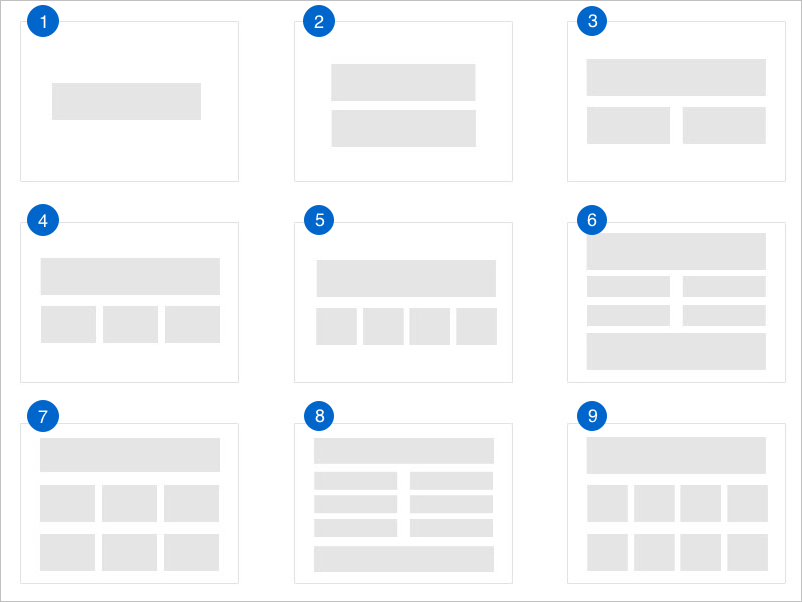
    I doesn't matter. You can set it up however you want, using the column classes inside one text widget (which is the manual way if you need more control) or just adding multiple widgets into that widget area will automatically arrange it into columns, depending on how many widgets you add.

    Here are the layout options depending on how many widgets you add;
    layout options.

    All explained in the setup instructions.


    I love helping creative entrepreneurs build epic things with WP & Genesis.

    Follow on Twitter

    June 25, 2017 at 4:43 pm #208267
    Sapphira
    Member

    Hi Fave

    Yes, I've already worked that out now but I thank you for the reply, it is much appreciated. One thing I'd like to know is how I can add an image to each widget because these ones are only text widgets and not featured image widgets, which this theme doesn't have.

    Much thanks,
    Sapphira.

    June 25, 2017 at 6:05 pm #208268
    ᴅᴀᴠɪᴅ
    Member

    You can either choose the 'image' widget instead of the text. Or just add an image into the text widget via html, like you would in a post or page. ie

    <img src="https://yourwebsite.com/image-url">

    See.. how to add images to widgets


    I love helping creative entrepreneurs build epic things with WP & Genesis.

    Follow on Twitter

    June 26, 2017 at 5:51 am #208277
    Sapphira
    Member

    Hi Dave

    That makes sense, now why didn't I realise that!

    Many thanks for you replies.

    Kind regards,
    Sapphira.

  • Author
    Posts
Viewing 6 posts - 1 through 6 (of 6 total)
  • The forum ‘General Discussion’ is closed to new topics and replies.

CTA

Ready to get started? Create a site or shop for themes.

Create a site with WP EngineShop for Themes

Footer

StudioPress

© 2026 WPEngine, Inc.

Products
  • Create a Site with WP Engine
  • Shop for Themes
  • Theme Features
  • Get Started
  • Showcase
Company
  • Brand Assets
  • Terms of Service
  • Accptable Usse Policy
  • Privacy Policy
  • Refund Policy
  • Contact Us
Community
  • Find Developers
  • Forums
  • Facebook Group
  • #GenesisWP
  • Showcase
Resources
  • StudioPress Blog
  • Help & Documentation
  • FAQs
  • Code Snippets
  • Affiliates
Connect
  • StudioPress Live
  • StudioPress FM
  • Facebook
  • Twitter
  • Dribbble